@MrStickman
Profile channel
@MrStickman
No bio yet.
Since 30.05.2026
Deeper understanding of the code and software systems we work on, is not only pragmatic and practical but highly enjoyable as well ... But, if it is both joyful and powerful, why are we so often prone to skip the struggle to understand and take shortcuts, accepting copy-pasted/generated solutions and generic answers, not analyzed?
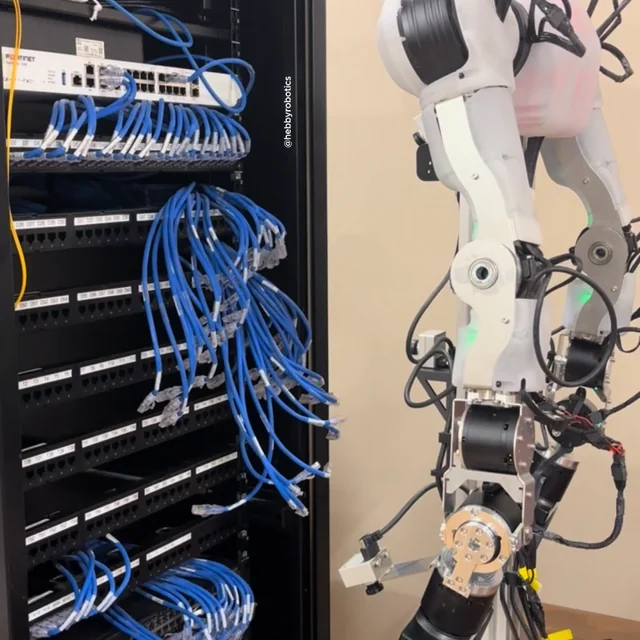
The scarce thing in a data center is not manpower, but instinct that only comes from years on the floor. Most robotics companies are focused on robots as a productivity amplifiers: 24/7 uptime, five days of work done in two. Few are focused on the potential of robots to change how people work altogether. We wanted to show what it looks like to rethink human-robot collaboration, using AI so a shrinking pool of experts can meet the increasing demands of future infrastructure. The obvious thing to automate is the rote physical work that consumes an expert's attention without needing critical judgment. Cabling tasks are the most common example of this. They're necessary when setting up any rack, but usually one-off, and labor is readily available to address this need. We think this is a good place to start, but the least interesting place to change how people work. Standard operating procedures (SOPs) are how critical infrastructure stays stable, and they're the work that scales worst. The video shows one common procedure: clearing the cables a technician leaves behind after testing, and reconciling the rack to a stable state for the next test. A robot that runs SOPs the same way every time, never skipping a step, keeps the system in a known, predictable state. This reduces the cognitive overhead on experts so they can solve harder problems. What most excites us is robots guiding where an expert's attention should go. In the video, the robot checks the switches with a thermal camera, then makes a judgment on whether the increase in temperature is a real problem or a spurious reading. This instinct requires an expert to synthesize all available background context and accumulated lessons from past failures. This is where we want to double down, and show how human-robot collaboration places scarce expert attention exactly where it matters. More to come. submitted by /u/kuaythrone [link] [Kommentare]
I have a copy of sicp, or as it is also known, The Wizard Book.11 Structure and Interpretation of Computer Programs; Abelson and Sussman; mit Press; 1996. This book is widely praised, but I can’t take the time to work my way through all of it. However, sometimes I jump into parts of it that look interesting. Today, we’ll see how to support multiple representations of data through tagging. This article is written in Haskell throughout, but at the start it will look a lot like the Lisp code in sicp. I have intentionally tried to recreate the sicp solution as closely as possible, including dynamic typing and all. See the appendix if you’re curious how it works. Complex numbers in two forms Complex numbers can be stored in their rectangular form, where there’s a real and an imaginary part. They can also be stored in polar form, where there’s a magnitude and an angle. The authors ask us to imagine that two people have been working on a library for mathematics, but ended up choosing different ways to store complex numbers. How can they write their code so that they don’t have to agree on one way to store the data? Abelson and Sussman propose a tagged representation, where the data of the complex numbers are paired with a tag, which indicates to the implementation what representation is being used. They suggest the following functions to attach a tag, as well as inspect tagged data. As a last reminder, this is Haskell code, but written in Lisp style to mimic the solution in sicp as closely as possible. In[1]: -- | Tag a value as having a particular representation. attach_tag tag contents = (cons tag contents) -- | Extract the type tag from a tagged value. type_tag datum = (if_ (is_pair datum) (car datum) (error "Bad tagged datum")) -- | Extract the value from a tagged value. contents datum = (if_ (is_pair datum) (cdr datum) (error "Bad tagged datum")) This code uses cons in the Lisp sense, i.e. it creates a pair of two values, with a left hand side, known as the car of the pair, and a right hand side, known as the cdr of the pair. With these, we can check if a complex number is stored in its rectangular or polar representation by inspecting its tag. In[2]: is_rectangular z = (eq (type_tag z) (quote "rectangular")) is_polar z = (eq (type_tag z) (quote "polar")) To create a complex number in either rectangular or polar form, we create a cons cell with the coordinates, and tag that cell with the appropriate symbol. In[3]: make_rectangular re im = (attach_tag (quote "rectangular") (cons re im)) make_polar r a = (attach_tag (quote "polar") (cons r a)) If we have the rectangular coordinates for a complex number, we can extract the real and imaginary part easily, too. These functions assume we have peeled off the tag, and that the data is in the correct format. In[4]: real_part_rectangular z = (car z) imag_part_rectangular z = (cdr z) Similarly, we can easily extract the polar coordinates from a complex number stored in its polar form. These implementations are the same as the above, because these functions are supposed to be run after we have verified the tag is correct, and the tag has been peeled off. In[5]: magnitude_polar z = (car z) angle_polar z = (cdr z) If we want to extract polar coordinates from a complex number stored in rectangular form, or vice versa, we’ll have to do some trigonometry. In[6]: magnitude_rectangular z = (sqrt_ (add_ (square_ (real_part_rectangular z)) (square_ (imag_part_rectangular z)))) angle_rectangular z = (atan_ (imag_part_rectangular z) (real_part_rectangular z)) real_part_polar z = (mul_ (magnitude_polar z) (cos_ (angle_polar z))) imag_part_polar z = (mul_ (magnitude_polar z) (sin_ (angle_polar z))) These functions also assume a particular representation, with the tag peeled off. But, now that we have all of the above, we can write our first generic functions, i.e. those that can work on either representation. They’ll do this by inspecting the tag and then performing the right operation depending on what representation is indicated by the tag. These generic functions will extract the respective coordinates for complex numbers regardless of their underlying representation, by dispatching on the type tag. In[7]: real_part z = (if_ (is_rectangular z) (real_part_rectangular (contents z)) (if_ (is_polar z) (real_part_polar (contents z)) (error "Unknown type"))) imag_part z = (if_ (is_rectangular z) (imag_part_rectangular (contents z)) (if_ (is_polar z) (imag_part_polar (contents z)) (error "Unknown type"))) magnitude z = (if_ (is_rectangular z) (magnitude_rectangular (contents z)) (if_ (is_polar z) (magnitude_polar (contents z)) (error "Unknown type"))) angle z = (if_ (is_rectangular z) (angle_rectangular (contents z)) (if_ (is_polar z) (angle_polar (contents z)) (error "Unknown type"))) Given these, the two people no longer have to agree on how they should store complex numbers. Each can choose their own representation, and then they can write generic maths functions over complex numbers, like these. In[8]: add_complex za zb = (make_rectangular (add_ (real_part za) (real_part zb)) (add_ (imag_part za) (imag_part zb))) mul_complex za zb = (make_polar (mul_ (magnitude za) (magnitude zb)) (add_ (angle za) (angle zb))) These functions are written to exploit that addition of complex numbers is easier in rectangular form, but multiplication is easier in polar form. It doesn’t matter how za and zb are stored, because we get the appropriate coordinates out of them either way. This is the solution in sicp, and we did it in Haskell. But now I got curious if we could leverage the strengths of Haskell to make the code more clear. Ripping out the dynamic typing Dynamic typing has two main drawbacks: When we make a mistake, the code will blow up at 3 am and some poor sod will have to wake up to restore production. Code can get unnecessarily complicated because we are not giving the compiler a chance to help us out. For these reasons, we’ll try to move away from dynamic typing. The first change we’ll make is switch the cons cells for tagged values into actual, compiler-recognised tuples. In[9]: attach_tag tag contents = (tag, contents) type_tag (tag, _) = tag contents (_, datum) = datum This is not much, but it simplifies the tagging code. To take it one step further, there’s no reason for the tag symbol to be dynamically typed, so we’ll change that to a compiler-recognised string. That requires changes to the tag introspection functions and the constructor functions. In[10]: is_rectangular z = type_tag z == "rectangular" is_polar z = type_tag z == "polar" make_rectangular re im = (attach_tag "rectangular" (cons re im)) make_polar r a = (attach_tag "polar" (cons r a)) Previously, if we accidentally wrote code that tried to extract the type tag from a complex number that is not tagged, that would become one of those midnight problems. With these two last changes, that mistake would instead be a compiler error. Much better. For even greater impact, we’ll change the complex value cons cell into a compiler-recognised tuple. This requires changes to the construction of complex numbers, and extraction of coordinates from complex numbers. In[11]: make_rectangular re im = (attach_tag "rectangular" (re, im)) real_part_rectangular (re, _) = re imag_part_rectangular (_, im) = im magnitude_rectangular (re, im) = (sqrt_ (add_ (square_ re) (square_ im))) angle_rectangular (re, im) = (atan_ im re) make_polar r a = (attach_tag "polar" (r, a)) magnitude_polar (r, _) = r angle_polar (_, a) = a real_part_polar (r, a) = (mul_ r (cos_ a)) imag_part_polar (r, a) = (mul_ r (sin_ a)) With this, additional run-time errors disappeared. Previously we called car and cdr on the complex numbers. If we accidentally pass something that’s not a complex number to these functions, it’d blow up in the middle of the night. Now it’s a compiler error. We also benefited from pattern matching to make the code a little easier to read. The next step is to switch the numbers used from dynamic values to compiler-recognised Double values. This removes even more run-time errors, because then it will be impossible to accidentally construct complex numbers out of any values that aren’t numbers. The only changes necessary for this is that any time we do maths, we use the native Haskell operators and functions instead. In[12]: magnitude_rectangular (re, im) = (sqrt (re^2 + im^2)) angle_rectangular (re, im) = atan2 im re real_part_polar (r, a) = r * cos a imag_part_polar (r, a) = r * sin a add_complex za zb = make_rectangular (real_part za + real_part zb) (imag_part za + imag_part zb) mul_complex za zb = make_polar (magnitude za * magnitude zb) (angle za + angle zb) At this point, the code is simpler and more robust, but we’re not done yet. Making the compiler aware of the tagging We’re tagging values with what representation they’re using. Haskell supports this natively, so we don’t have to invent it ourselves. To use the native Haskell tagging, we’ll create a data type with constructors for each type of representation. In[13]: data Complex = Rectangular Double Double | Polar Double Double The tags are now functions that can be called as constructors, and we can use pattern matching to deconstruct them. We proceed to remove all the code we wrote up to this point, and replace it with: In[14]: real_part = \case Rectangular re _ -> re Polar r a -> r * cos a imag_part = \case Rectangular _ im -> im Polar r a -> r * sin a magnitude = \case Rectangular re im -> sqrt (re^2 + im^2) Polar r _ -> r angle = \case Rectangular re im -> atan2 im re Polar _ a -> a add_complex za zb = Rectangular (real_part za + real_part zb) (imag_part za + imag_part zb) mul_complex za zb = Polar (magnitude za * magnitude zb) (angle za + angle zb) How cool is that? We went from 80 lines of Lisp down to 30 lines of Haskell. That’s what happens with high level languages: instead of rolling our own tagging system to handle multiple representations, we use the tagging system built into the language.22 I’m aware modern Lisp-likes, among them Common Lisp, do support tagging natively. It’s still dynamically typed, though! But when we get to this point in the book, Abelson and Sussman reveal that the tagging approach might not be ideal. They propose another alternative: data-directed programming. That’s where we’ll go in the next article. Appendix A: The Lisp library It was a little weird writing dynamically typed Lisp-like code in Haskell, but these were the definitions that made it possible. They’re not general enough to be used as a Lisp replacement, but were tailored for this code in particular. In[15]: import Data.Dynamic -- | Create a symbol. (I know strings are not symbols. Shush!) quote :: String -> Dynamic quote = toDyn -- | Compare two symbols for equality. eq :: Dynamic -> Dynamic -> Bool eq lhs rhs = let sa = fromDyn @String lhs (error "eq: LHS was not a string") sb = fromDyn @String rhs (error "eq: RHS was not a string") in sa == sb -- | Create a numeric value. number :: Double -> Dynamic number = toDyn -- | Make a cons cell from two values. cons :: Dynamic -> Dynamic -> Dynamic cons a b = toDyn (a, b) -- | Extract the first part of a cons cell. car :: Dynamic -> Dynamic car d = case fromDynamic @(Dynamic, Dynamic) d of Just (a, _) -> a _ -> error "car: value was not a pair" -- | Extract the second part of a cons cell. cdr :: Dynamic -> Dynamic cdr d = case fromDynamic @(Dynamic, Dynamic) d of Just (_, b) -> b _ -> error "car: value was not a pair" -- | Check if a value is a dynamic cons cell. is_pair :: Dynamic -> Bool is_pair d = case fromDynamic @(Dynamic, Dynamic) d of Just (_, _) -> True _ -> False -- | A Lisp-like if function without the pesky -- syntax of if/then/else. if_ :: Bool -> a -> a -> a if_ p a b = if p then a else b -- | Apply a numeric function to a dynamic value. apply'1 :: (Double -> Double) -> Dynamic -> Dynamic apply'1 = dynApp . toDyn -- | Apply a numeric binary operator to dynamic values. apply'2 :: (Double -> Double -> Double) -> Dynamic -> Dynamic -> Dynamic apply'2 f = dynApp . (dynApp (toDyn f)) -- | Numeric functions and binary operators we use. add_ = apply'2 (+) mul_ = apply'2 (*) square_ = apply'1 (^2) sqrt_ = apply'1 sqrt cos_ = apply'1 cos sin_ = apply'1 sin atan_ = apply'2 atan2

Projects, tags, contexts, priorities, UDAs, dates, and annotations. If Taskwarrior supports it, WingTask shows it. Alex remembers he still needs to research where to stay in Tokyo before booking flights. WingTask supports Taskwarrior command syntax directly in the quick add field. Projects, tags, priorities, dates, and metadata can be entered naturally without interrupting workflow. Alex is an the Aquarium Exhibit Designer for Pacific Marine Center. He's working on a new exhibit and needs to add some tasks. WingTask retains it's concept of projects. WingTask makes adding multiple tasks easier. Alex is starting his day. He wants to put WingTask in "at work" mode so he creates a list for his work tasks and sets it as his current context. WingTask allows creating arbitrary lists to organize tasks. Those lists can be set as contexts, which filters the tasks, tags, and projects to only those that are in the context list. Alex schedules a task to be done on a specific date. He then views the calendar to see his scheduled tasks. WingTask allows scheduling tasks for specific dates and times. Calendar views show scheduled tasks in a monthly, weekly, or daily calendar format. Alex completes some tasks for a project and deletes one. He then views the completed and deleted tasks in the project's tabs. WingTask allows viewing completed and deleted tasks in their own tabs.
Managing flow content can get unwieldy—too many class selectors can become a specificity headache, nested styling can get redundant, and content editors don’t always understand the presentational m…

GitLab.com
A new python interpreter that supports inline frontier intelligence powered conditionals with native performance - hopafoot/arabian-sand-boa
I have some 35-48v 500w bldc motors (e-skateboard motors) that I want to use for my robotics projects. They are much higher power than the small gimbal motors I typically use with Simple FOC drivers, so I'm wondering what's the typical setup for these high power motors. Power supply: better to use a big lipo battery or a wall power supply? From what I've seen, batteries can provide more current but are kind of dangerous? Controller: I want to use an FOC drive to precisely control position. the motor has an encoder built-in. I was looking into the ST G431 driver, but I'm not sure if it can handle so much power. I'm quite new in BLDC control and high power electronics, any advice or info would be really helpful! submitted by /u/the_relentless_epee [link] [Kommentare]

Claude Opus 4.5 vs GLM-5.2 Claude Opus 4.5 (2025) and GLM-5.2 (2026) are frontier-tier reasoning models from Anthropic and Zhip...

Get real reviews for Chrome extensions, Edge add-ons, and Android apps. Boost store ranking with authentic reviews, SEO backlinks, and market analytics.

A world grown from your real light. You don't pick the one that returns.