Channels
The DeepSeek team announced on Monday that the official release of DeepSeek V4 is scheduled for mid-July. According to the company, the new version builds

Author validation schemas in TypeScript, compile them to a portable JSON IR, and run the exact same rules in TypeScript and Rust. 60+ domain validators, cross-field rules, transforms, and full type inference.

The optical periscope camera OPIC, a scientific instrument bound for Estonia's first deep-space mission, departed Tartu Airport for Spain on Tuesday. The camera will photograph the nucleus of a comet.

Merge, split, compress and edit PDFs entirely in your browser. Your files never leave your device, no uploads, no servers, 100% private.
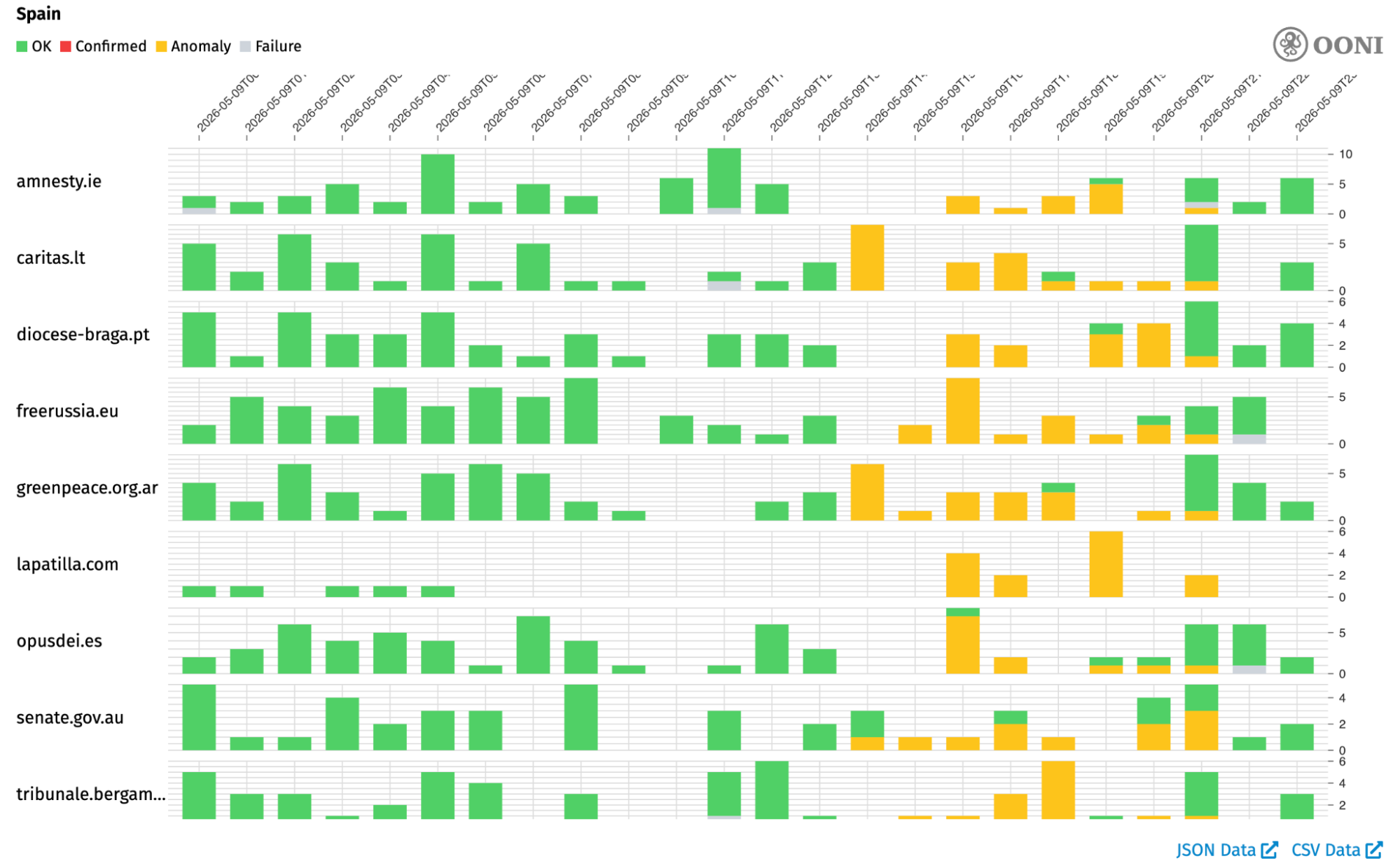
This report documents the widespread collateral damage caused by IP-based blocking during LALIGA football match broadcasts in Spain, based on OONI data and DNS scans.


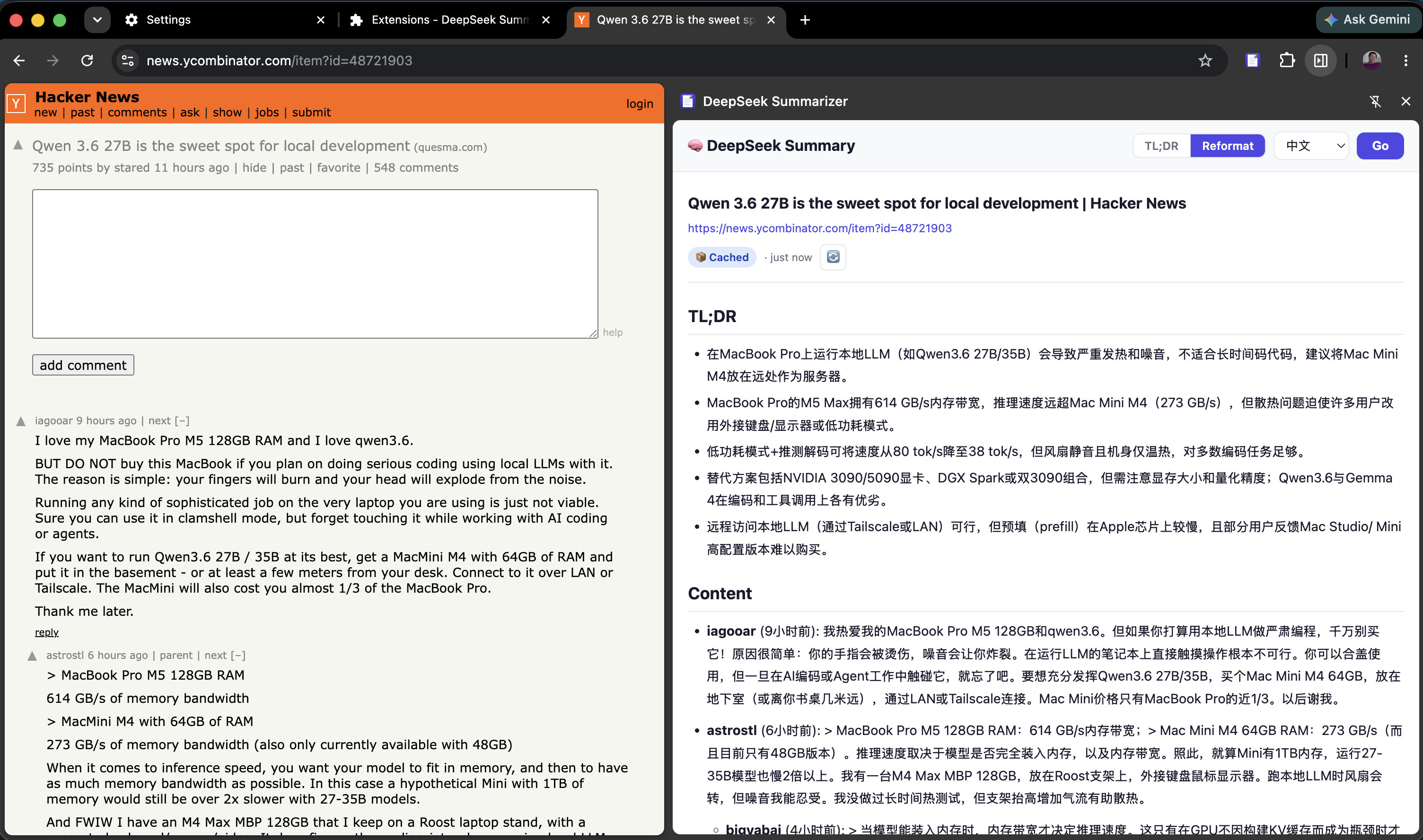
cwsum A Chrome extension that summarizes and reformats any webpage with AI — with full bilingual support for English and Chinese output. cwsum is a Manifest V3 extension that opens a clean right-side panel on any webpage. Choose TL;DR for bullet-point takeaways or Reformat for a clean, readable Markdown version of the full page with images, links, and tables preserved. Both modes support English and Chinese output, streaming results word-by-word as the AI generates them. Your API key stays on your machine — no analytics, no intermediary servers. One click Open the side panelfrom the toolbar orCmd+Shift+S Your API key DeepSeek or OpenAI.Key stored in Chrome,never leaves your box Manifest V3 Modern Chrome extension.No build step, vanilla JS,~15 source files ⤓ Download cwsum.zip Chrome 116+ · Manifest V3 67 KB · zip archive · load unpacked in chrome://extensions The side panel — language selector, cache badge, and a Markdown-rendered AI summary. Cached result — instant reload with relative timestamp. Options — API key, model, and endpoint configuration. Reformat mode — full-page Markdown with images, links, and tables preserved. What it is cwsum is a Chrome extension that puts AI summarization one click away on any webpage. Click the toolbar icon (or press Cmd+Shift+S) and the side panel opens with a structured summary of whatever you’re reading. The extension extracts the page’s visible text — stripping out navigation, sidebars, ads, and scripts — and sends it to the AI endpoint you configure. Your API key lives in chrome.storage.sync and is never sent anywhere except directly to the API endpoint you specify. The extension has no analytics, no tracking, and no intermediate server. It is a thin client between your browser and your AI provider. Page content goes from your tab to the model; the summary goes from the model to the side panel. Nothing else happens. Features AI-powered summaries Extracts page content and produces concise, structured summaries with key points, notable facts, and main takeaways. Works on articles, documentation, research papers, and any text-heavy page. Two modes, one panel TL;DR gives you bullet-point takeaways in under 200 words. Reformat restructures the entire page as clean Markdown with images, links, and tables preserved — like a reader-mode that keeps the good parts. Both stream results live as they’re generated. Bilingual output Toggle between English and Chinese (中文) output with a single click. Each language gets its own cache entry — switch freely without losing results. Smart caching Revisiting a page shows the cached summary instantly with no API call. A Cached badge tells you it came from local storage, with a relative timestamp (“3m ago”). Click the refresh button to force a fresh fetch. Markdown + highlighting Summaries render with full GitHub-flavored Markdown: headings, bullet lists, blockquotes, tables, and links. Fenced code blocks get syntax highlighting via highlight.js with a clean GitHub theme. Keyboard shortcut Open the side panel without touching the mouse: ⌘ShiftS on Mac, CtrlShiftS on Windows and Linux. Configurable model Set any OpenAI-compatible model in the Options page. Defaults to deepseek-v4-flash, the cheapest DeepSeek model at $0.14/M input tokens. Also works with OpenAI, Anthropic endpoints, or any compatible API. Keyboard Everything is reachable from the keyboard or a single click. ⌘ShiftS / CtrlShiftSOpen the side panel Click extension iconOpen the side panel Language dropdownSwitch between English and Chinese Mode tabsSwitch between TL;DR and Reformat modes in the panel header Refresh button 🔄Re-summarize — skip cache, fresh API call Right-click icon → OptionsSet API key, model, and default language FAQ Which AI models does it support? Any OpenAI-compatible chat completions endpoint. It ships with deepseek-v4-flash as the default — the cheapest DeepSeek model at $0.14/M input tokens. You can change the model name and API base URL in the extension Options. Is my data safe? Your API key is stored in Chrome’s encrypted sync storage and is only sent to the API endpoint you configure. The extension has no analytics, no tracking, and no intermediate server. Page content goes directly from your browser to your AI provider. What gets sent to the AI? The page title, URL, and up to 12,000 characters of visible body text (with navigation, sidebars, ads, and scripts stripped out). The extraction is trimmed to keep API costs low. Can I use it with OpenAI instead of DeepSeek? Yes. Change the model to gpt-4o-mini and update the API endpoint URL if your OpenAI base URL differs. The extension uses the standard chat completions format. Is it open source? Yes. The full source is ~15 files, vanilla JS, no build step, no framework. Available on GitHub. Install & use cwsum is a Chrome Manifest V3 extension. It runs in any Chromium-based browser (Chrome 116+, Edge, Brave, Arc). Load it once and it stays out of your way. ⤓ Download cwsum.zip Chrome 116+ · Manifest V3 · 67 KB Unzip to a permanent folder, open chrome://extensions, enable Developer mode, click Load unpacked, and select the folder. Then right-click the icon → Options to set your API key.
Photon, Moondream's inference engine, achieves near-realtime VLM inference (~33ms on NVIDIA B200). This is a peek into how it delivers up to 35% higher decode throughput by optimizing how the GPU works.

The US Supreme Court decided that the US Federal Trade Commission (“FTC”) may not be independent anymore - with major implications for EU-US Data Transfers.
⚠️ Informational Use Only — ZT-AI responses are AI-generated and may not always be accurate. Do not rely on them for legal, medical, financial, or professional advice. ⚠️ No Server Storage — Your conversations are never saved to our servers. All chat history is lost permanently when you close this tab. ⚠️ We Use No Cookies or Tracking — We do not use cookies, trackers, or any tool to monitor or identify you. We have no idea who you are and we like it that way. ⚠️ Your Device May Store Data — Your browser may locally cache data or session information. For maximum privacy, use Incognito/Private browsing mode, a VPN, and clear your cache after each session. ⚠️ No Sensitive Information — Do not share passwords, financial details, government IDs, or other personal sensitive data in this chat. ⚠️ Age Requirement — You must be at least 18 years of age to use this service. ⚠️ No Liability — Zero Trace AI and its owners are not liable for any misuse, damages, losses, or harm of any kind arising from use of this service or AI-generated content. ⚠️ Lawful Use Only — You agree not to use this service for any illegal, harmful, or malicious purposes. ⚠️ Service Changes — We reserve the right to modify, suspend, or discontinue any part of this service at any time without notice. Enter your Pro or Ultra access token to unlock more queries and features. Token is saved in your browser. Incognito mode clears it on close. Private AI chat. No logs, no history, no tracking. Your conversation disappears when you close this tab. 💡 ZT-AI is built for getting real answers privately — not small talk. Use your queries for things you actually want kept private. For casual stuff, any free mainstream AI will do. Your queries here are worth more than that. 🤖 Free tier: AI knowledge only — no live internet. Upgrade to Pro or Ultra for live web search. 🔒 Your token and terms acceptance are stored locally in your browser only — never on our servers. Conversations are never stored anywhere. Full privacy policy → Enter the email you used when you subscribed. We'll open Stripe's secure portal so you can cancel, upgrade, or update your payment. 🔒 We don't store your email — we pass it directly to Stripe to find your account. We never see or store what you type here. Bonus queries that never expire. Used automatically when your daily limit runs out. Upgrade to Pro or Ultra for more queries per pack at the same price. View plans →