cwcode
A terminal coding agent built around DeepSeek V4 Pro,
Qwen3.6‑27B, Kimi, Azure, and anything else that speaks OpenAI’s
chat API.
Written in Go. Lives in your terminal. Edits real code. Recovers from its own
mistakes. Costs about $0.40 to leave running for an hour.
5%
of Claude’s token coston DeepSeek V4 Pro
85%+
prefix-cache hit ratioafter turn 3
~12k
lines of Gono external services
What it is
cwcode is a Bubbletea TUI that drives any OpenAI-compatible chat endpoint
as a tool-using coding agent. It ships with profiles for DeepSeek (Pro and
Flash), Azure OpenAI, Kimi for Coding, and a local vLLM /
llama.cpp profile for Qwen3.6-27B on a home server. Switching profiles
mid-session is one slash command.
It has bash, file edit, glob, grep, web fetch, headless-Chrome fetch
(driven via CDP through your real browser), sub-agents, a persistent
semantic-memory store, content-addressed checkpoints with rewind, a
plan/code mode toggle, and an autonomous goal loop. The tool registry
is six hundred lines and adding a new tool is a two-method Go interface.
It is not a SaaS. There is no account, no telemetry, no remote control
plane. Your API key sits in ~/.cwcode/config.json. Your
session history sits in ~/.cwcode/sessions/. If your
network is down and the model endpoint is local, the agent keeps
working.
Why it’s different
Hash-anchored edits
The read_file tool annotates every line with a 3-character
content hash: 42:a3f| return x.
The edit_lines tool takes
(line, hash, new_text) and rejects the entire batch if
any hash drifted. The model never has to reproduce content
character-perfect to land an edit. Adopted from
Can Akay’s
February 2026 post and ported to Go in about 200 lines.
Output tokens per session dropped 30–40% on V4 Pro.
Sticky prefix cache
The system prompt is byte-stable across turns. Tool definitions
serialize in a deterministic order. Reasoning content is stripped
from outbound requests on every provider by default. DeepSeek’s
prompt-cache hit path is ~120× cheaper than the miss path,
and our /cache slash command shows session-cumulative
hit ratio that routinely exceeds 85% after the third turn.
Plan vs code mode
A single Shift+Tab toggle between read-only
planning (the LLM only sees non-mutating tools) and full execution.
The model doesn’t see the flag — it just sees a different
(smaller) tool registry and a system-prompt addendum. The human
holds final control unless you opt into YOLO mode.
Checkpoint & rewind
Before any file-mutating tool runs, the harness snapshots the
pre-state of every path the tool declares it will touch. Snapshots
are SHA-256-keyed blobs in ~/.cwcode/sessions//objects/,
deduped automatically. /rewind N restores files,
truncates conversation history, and pre-fills the input box with
the original prompt.
Storm-breaker
When the same tool fails identically three times in a row, the
harness doesn’t silently abort. It synthesizes a
plain-language response (“I’m unable to continue:
read_file failed three times because the path was empty.
Please clarify…”), streams it like a normal reply, and
appends it to history so follow-ups have context.
Autonomous goal loop
/goal appends a goal to
goals.md. /goal on starts an autonomous
loop that runs back-to-back turns until every checkbox is marked
done or until a safety cap of 20 consecutive cycles. We use this
for four-hour overnight runs on annotated tasks.
No SaaS lock-in
Config is JSON. Sessions are JSON. Checkpoints are content-addressed
blobs. Memory store is a SQLite file. Everything lives under
~/.cwcode/. If the project disappeared tomorrow your
sessions are still readable.
What it looks like
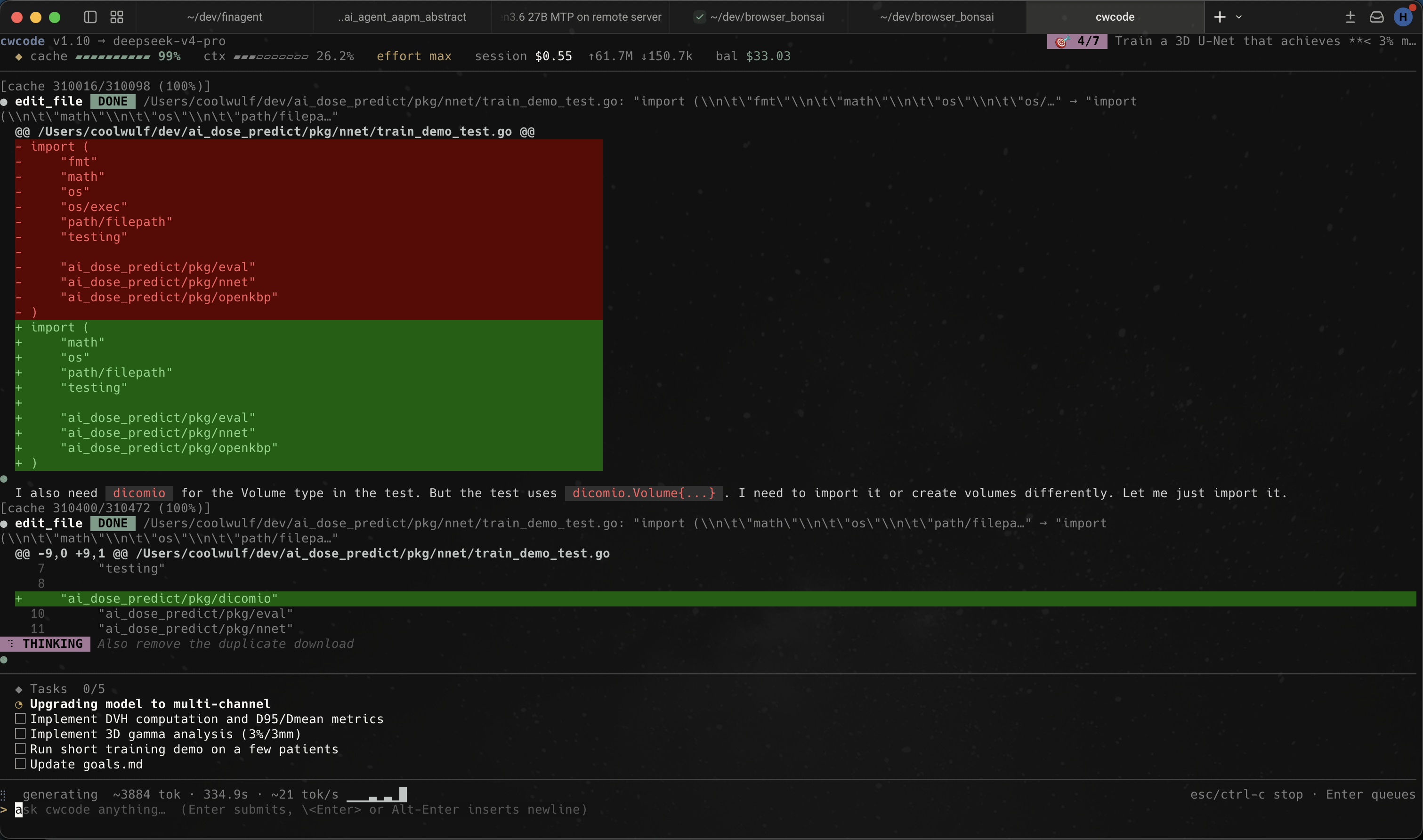
Captured during real work on our dose-prediction codebase: the agent
proposing an edit_file change to a Go test, with a unified
diff highlighted inline, the reasoning trace streaming below, and the
current task list pinned to the bottom of the pane.
cwcode running a Go test edit; multi-tab tmux session,
dose-prediction project, DeepSeek profile.
Install
Download a pre-built binary for your platform from the
Google Drive release folder
(current build: v1.11; macOS arm64 / amd64 and Windows amd64). Drop it
somewhere on your PATH and make it executable:
curl -L -o ~/.local/bin/cwcode
chmod +x ~/.local/bin/cwcode
cwcode -version
You’ll need an OpenAI-compatible endpoint (DeepSeek API key,
Azure deployment, local vLLM, or whatever else you have on hand).
Configure a profile in ~/.cwcode/config.json:
{
"active_profile": "deepseek-pro",
"profiles": {
"deepseek-pro": {
"provider": "deepseek",
"endpoint": "https://api.deepseek.com",
"model": "deepseek-v4-pro",
"api_key": "sk-...",
"ctx_size": 262144
}
}
}
Run it.
cwcode # Bubbletea TUI
cwcode -p "fix the bug" # one-shot, no session
cwcode -continue # resume the most recent session
cwcode -plain # stdout REPL (no TUI)
Built-in tools
namepurposeneeds approval
bashrun a shell command (streaming output)yes
bash_backgroundspawn a long-running processyes
read_fileread with per-line content hashesno
write_filecreate or overwrite a fileyes
edit_fileexact-string replace with whitespace recoveryyes
edit_filesatomic multi-file batch (exact-string)yes
edit_lineshash-anchored line replacementyes
globfind files by patternno
grepsearch files for a regexno
lslist directory contentsno
web_fetchfetch a URL and clean it upno
chrome_fetchdrive your real Chrome via CDP for bot-blocked pagesno
taskspawn a sub-agent with its own contextyes
rememberadd a fact to the persistent memory storeno
recallsemantic search over past sessionsno
todo_writeupdate the visible task listno
FAQ
Why Go?
Single static binary, fast startup, easy cross-compile.
Three platform builds in 90 seconds. The TUI binary on macOS is 24 MB
with debug symbols stripped.
Why a terminal app and not a VS Code extension?
Because we wanted the agent to be the primary interface,
not a side panel. The TUI gives the model the whole pane to work in
and gives us a small surface to debug. If you live in VS Code, you
can run cwcode in the integrated terminal.
Does it work with Claude?
Not directly — cwcode speaks the OpenAI
/v1/chat/completions shape. Claude has its own API.
You can put Claude behind a translating proxy if you want, but
we built this for the cost shift in the other direction.
What model do you use day to day?
DeepSeek V4 Pro for most coding work, Flash for quick
questions and one-shot scripts, the local Qwen3.6‑27B profile
when we want zero latency or are working offline.
Is the source available?
Pre-built binaries are on
Google Drive.
Source is currently private; we plan to open it once the API surface
settles. If you want a peek before then,
get in touch.
Who built this?
A small team that uses it daily for dose-prediction
model training, financial research agents, and writing cwcode
itself. The agent ships its own bugs and writes its own fixes.
 Link preview
cwcode — a terminal coding agent
cwcode A terminal coding agent built around DeepSeek V4 Pro, Qwen3.6‑27B, Kimi, Azure, and anything else that speaks OpenAI’s chat API. Written in Go. Lives in your terminal. Edits real code. Recovers from its own mistakes. Costs about $0.40 to leave running for an hour. 5% of Claude’s token coston DeepSeek V4 Pro 85%+ prefix-cache hit ratioafter turn 3 ~12k lines of Gono external services What it is cwcode is a Bubbletea TUI that drives any OpenAI-compatible chat endpoint as a tool-using coding agent. It ships with profiles for DeepSeek (Pro and Flash), Azure OpenAI, Kimi for Coding, and a local vLLM / llama.cpp profile for Qwen3.6-27B on a home server. Switching profiles mid-session is one slash command. It has bash, file edit, glob, grep, web fetch, headless-Chrome fetch (driven via CDP through your real browser), sub-agents, a persistent semantic-memory store, content-addressed checkpoints with rewind, a plan/code mode toggle, and an autonomous goal loop. The tool registry is six hundred lines and adding a new tool is a two-method Go interface. It is not a SaaS. There is no account, no telemetry, no remote control plane. Your API key sits in ~/.cwcode/config.json. Your session history sits in ~/.cwcode/sessions/. If your network is down and the model endpoint is local, the agent keeps working. Why it’s different Hash-anchored edits The read_file tool annotates every line with a 3-character content hash: 42:a3f| return x. The edit_lines tool takes (line, hash, new_text) and rejects the entire batch if any hash drifted. The model never has to reproduce content character-perfect to land an edit. Adopted from Can Akay’s February 2026 post and ported to Go in about 200 lines. Output tokens per session dropped 30–40% on V4 Pro. Sticky prefix cache The system prompt is byte-stable across turns. Tool definitions serialize in a deterministic order. Reasoning content is stripped from outbound requests on every provider by default. DeepSeek’s prompt-cache hit path is ~120× cheaper than the miss path, and our /cache slash command shows session-cumulative hit ratio that routinely exceeds 85% after the third turn. Plan vs code mode A single Shift+Tab toggle between read-only planning (the LLM only sees non-mutating tools) and full execution. The model doesn’t see the flag — it just sees a different (smaller) tool registry and a system-prompt addendum. The human holds final control unless you opt into YOLO mode. Checkpoint & rewind Before any file-mutating tool runs, the harness snapshots the pre-state of every path the tool declares it will touch. Snapshots are SHA-256-keyed blobs in ~/.cwcode/sessions//objects/, deduped automatically. /rewind N restores files, truncates conversation history, and pre-fills the input box with the original prompt. Storm-breaker When the same tool fails identically three times in a row, the harness doesn’t silently abort. It synthesizes a plain-language response (“I’m unable to continue: read_file failed three times because the path was empty. Please clarify…”), streams it like a normal reply, and appends it to history so follow-ups have context. Autonomous goal loop /goal appends a goal to goals.md. /goal on starts an autonomous loop that runs back-to-back turns until every checkbox is marked done or until a safety cap of 20 consecutive cycles. We use this for four-hour overnight runs on annotated tasks. No SaaS lock-in Config is JSON. Sessions are JSON. Checkpoints are content-addressed blobs. Memory store is a SQLite file. Everything lives under ~/.cwcode/. If the project disappeared tomorrow your sessions are still readable. What it looks like Captured during real work on our dose-prediction codebase: the agent proposing an edit_file change to a Go test, with a unified diff highlighted inline, the reasoning trace streaming below, and the current task list pinned to the bottom of the pane. cwcode running a Go test edit; multi-tab tmux session, dose-prediction project, DeepSeek profile. Install Download a pre-built binary for your platform from the Google Drive release folder (current build: v1.11; macOS arm64 / amd64 and Windows amd64). Drop it somewhere on your PATH and make it executable: curl -L -o ~/.local/bin/cwcode chmod +x ~/.local/bin/cwcode cwcode -version You’ll need an OpenAI-compatible endpoint (DeepSeek API key, Azure deployment, local vLLM, or whatever else you have on hand). Configure a profile in ~/.cwcode/config.json: { "active_profile": "deepseek-pro", "profiles": { "deepseek-pro": { "provider": "deepseek", "endpoint": "https://api.deepseek.com", "model": "deepseek-v4-pro", "api_key": "sk-...", "ctx_size": 262144 } } } Run it. cwcode # Bubbletea TUI cwcode -p "fix the bug" # one-shot, no session cwcode -continue # resume the most recent session cwcode -plain # stdout REPL (no TUI) Built-in tools namepurposeneeds approval bashrun a shell command (streaming output)yes bash_backgroundspawn a long-running processyes read_fileread with per-line content hashesno write_filecreate or overwrite a fileyes edit_fileexact-string replace with whitespace recoveryyes edit_filesatomic multi-file batch (exact-string)yes edit_lineshash-anchored line replacementyes globfind files by patternno grepsearch files for a regexno lslist directory contentsno web_fetchfetch a URL and clean it upno chrome_fetchdrive your real Chrome via CDP for bot-blocked pagesno taskspawn a sub-agent with its own contextyes rememberadd a fact to the persistent memory storeno recallsemantic search over past sessionsno todo_writeupdate the visible task listno FAQ Why Go? Single static binary, fast startup, easy cross-compile. Three platform builds in 90 seconds. The TUI binary on macOS is 24 MB with debug symbols stripped. Why a terminal app and not a VS Code extension? Because we wanted the agent to be the primary interface, not a side panel. The TUI gives the model the whole pane to work in and gives us a small surface to debug. If you live in VS Code, you can run cwcode in the integrated terminal. Does it work with Claude? Not directly — cwcode speaks the OpenAI /v1/chat/completions shape. Claude has its own API. You can put Claude behind a translating proxy if you want, but we built this for the cost shift in the other direction. What model do you use day to day? DeepSeek V4 Pro for most coding work, Flash for quick questions and one-shot scripts, the local Qwen3.6‑27B profile when we want zero latency or are working offline. Is the source available? Pre-built binaries are on Google Drive. Source is currently private; we plan to open it once the API surface settles. If you want a peek before then, get in touch. Who built this? A small team that uses it daily for dose-prediction model training, financial research agents, and writing cwcode itself. The agent ships its own bugs and writes its own fixes. Source: https://code.intellios.ai code.intellios.ai · code.intellios.ai
Link preview
cwcode — a terminal coding agent
cwcode A terminal coding agent built around DeepSeek V4 Pro, Qwen3.6‑27B, Kimi, Azure, and anything else that speaks OpenAI’s chat API. Written in Go. Lives in your terminal. Edits real code. Recovers from its own mistakes. Costs about $0.40 to leave running for an hour. 5% of Claude’s token coston DeepSeek V4 Pro 85%+ prefix-cache hit ratioafter turn 3 ~12k lines of Gono external services What it is cwcode is a Bubbletea TUI that drives any OpenAI-compatible chat endpoint as a tool-using coding agent. It ships with profiles for DeepSeek (Pro and Flash), Azure OpenAI, Kimi for Coding, and a local vLLM / llama.cpp profile for Qwen3.6-27B on a home server. Switching profiles mid-session is one slash command. It has bash, file edit, glob, grep, web fetch, headless-Chrome fetch (driven via CDP through your real browser), sub-agents, a persistent semantic-memory store, content-addressed checkpoints with rewind, a plan/code mode toggle, and an autonomous goal loop. The tool registry is six hundred lines and adding a new tool is a two-method Go interface. It is not a SaaS. There is no account, no telemetry, no remote control plane. Your API key sits in ~/.cwcode/config.json. Your session history sits in ~/.cwcode/sessions/. If your network is down and the model endpoint is local, the agent keeps working. Why it’s different Hash-anchored edits The read_file tool annotates every line with a 3-character content hash: 42:a3f| return x. The edit_lines tool takes (line, hash, new_text) and rejects the entire batch if any hash drifted. The model never has to reproduce content character-perfect to land an edit. Adopted from Can Akay’s February 2026 post and ported to Go in about 200 lines. Output tokens per session dropped 30–40% on V4 Pro. Sticky prefix cache The system prompt is byte-stable across turns. Tool definitions serialize in a deterministic order. Reasoning content is stripped from outbound requests on every provider by default. DeepSeek’s prompt-cache hit path is ~120× cheaper than the miss path, and our /cache slash command shows session-cumulative hit ratio that routinely exceeds 85% after the third turn. Plan vs code mode A single Shift+Tab toggle between read-only planning (the LLM only sees non-mutating tools) and full execution. The model doesn’t see the flag — it just sees a different (smaller) tool registry and a system-prompt addendum. The human holds final control unless you opt into YOLO mode. Checkpoint & rewind Before any file-mutating tool runs, the harness snapshots the pre-state of every path the tool declares it will touch. Snapshots are SHA-256-keyed blobs in ~/.cwcode/sessions//objects/, deduped automatically. /rewind N restores files, truncates conversation history, and pre-fills the input box with the original prompt. Storm-breaker When the same tool fails identically three times in a row, the harness doesn’t silently abort. It synthesizes a plain-language response (“I’m unable to continue: read_file failed three times because the path was empty. Please clarify…”), streams it like a normal reply, and appends it to history so follow-ups have context. Autonomous goal loop /goal appends a goal to goals.md. /goal on starts an autonomous loop that runs back-to-back turns until every checkbox is marked done or until a safety cap of 20 consecutive cycles. We use this for four-hour overnight runs on annotated tasks. No SaaS lock-in Config is JSON. Sessions are JSON. Checkpoints are content-addressed blobs. Memory store is a SQLite file. Everything lives under ~/.cwcode/. If the project disappeared tomorrow your sessions are still readable. What it looks like Captured during real work on our dose-prediction codebase: the agent proposing an edit_file change to a Go test, with a unified diff highlighted inline, the reasoning trace streaming below, and the current task list pinned to the bottom of the pane. cwcode running a Go test edit; multi-tab tmux session, dose-prediction project, DeepSeek profile. Install Download a pre-built binary for your platform from the Google Drive release folder (current build: v1.11; macOS arm64 / amd64 and Windows amd64). Drop it somewhere on your PATH and make it executable: curl -L -o ~/.local/bin/cwcode chmod +x ~/.local/bin/cwcode cwcode -version You’ll need an OpenAI-compatible endpoint (DeepSeek API key, Azure deployment, local vLLM, or whatever else you have on hand). Configure a profile in ~/.cwcode/config.json: { "active_profile": "deepseek-pro", "profiles": { "deepseek-pro": { "provider": "deepseek", "endpoint": "https://api.deepseek.com", "model": "deepseek-v4-pro", "api_key": "sk-...", "ctx_size": 262144 } } } Run it. cwcode # Bubbletea TUI cwcode -p "fix the bug" # one-shot, no session cwcode -continue # resume the most recent session cwcode -plain # stdout REPL (no TUI) Built-in tools namepurposeneeds approval bashrun a shell command (streaming output)yes bash_backgroundspawn a long-running processyes read_fileread with per-line content hashesno write_filecreate or overwrite a fileyes edit_fileexact-string replace with whitespace recoveryyes edit_filesatomic multi-file batch (exact-string)yes edit_lineshash-anchored line replacementyes globfind files by patternno grepsearch files for a regexno lslist directory contentsno web_fetchfetch a URL and clean it upno chrome_fetchdrive your real Chrome via CDP for bot-blocked pagesno taskspawn a sub-agent with its own contextyes rememberadd a fact to the persistent memory storeno recallsemantic search over past sessionsno todo_writeupdate the visible task listno FAQ Why Go? Single static binary, fast startup, easy cross-compile. Three platform builds in 90 seconds. The TUI binary on macOS is 24 MB with debug symbols stripped. Why a terminal app and not a VS Code extension? Because we wanted the agent to be the primary interface, not a side panel. The TUI gives the model the whole pane to work in and gives us a small surface to debug. If you live in VS Code, you can run cwcode in the integrated terminal. Does it work with Claude? Not directly — cwcode speaks the OpenAI /v1/chat/completions shape. Claude has its own API. You can put Claude behind a translating proxy if you want, but we built this for the cost shift in the other direction. What model do you use day to day? DeepSeek V4 Pro for most coding work, Flash for quick questions and one-shot scripts, the local Qwen3.6‑27B profile when we want zero latency or are working offline. Is the source available? Pre-built binaries are on Google Drive. Source is currently private; we plan to open it once the API surface settles. If you want a peek before then, get in touch. Who built this? A small team that uses it daily for dose-prediction model training, financial research agents, and writing cwcode itself. The agent ships its own bugs and writes its own fixes. Source: https://code.intellios.ai code.intellios.ai · code.intellios.ai
Comments