 Link preview
Simulating 2D & 3D Robot Arms in Excel, with Inverse Kinematics
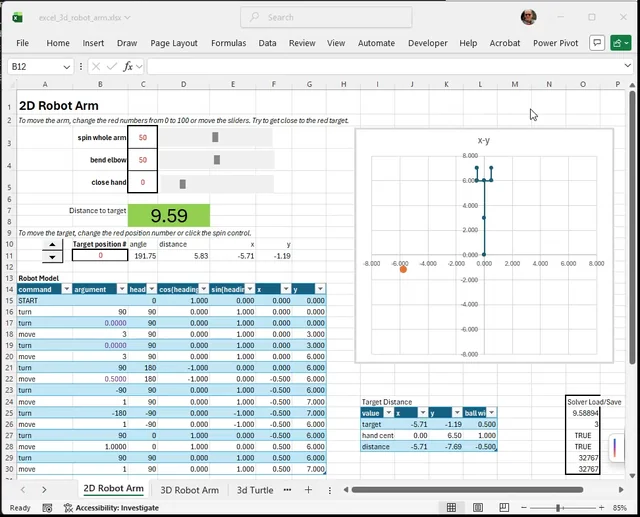
I made a playable Excel workbook that models a 2D and 3D robot arm using only ordinary spreadsheet formulas, charts, sliders, and Excel Solver. The idea is to make kinematics easier to understand. GitHub: https://github.com/CarlKCarlK/excel-3d-robot-arm The 3D arm is inspired by the old Radio Shack / TOMY Armatron toy robot arm. The workbook lets you move the arm manually, set a target point, and then use Excel's Solver to find the control settings that move the hand to the target (inverse kinematics!). I made this mostly as a learning project. Excel makes the math visible: the rotation matrices, position updates, target error, and Solver setup are all inspectable cell by cell. Nothing is hidden in a robotics library or graphics engine. The model itself is just a series of rows, each controlling one segment. The rows process 3 ways to turn (yaw, pitch, roll) or a move, turtle graphics-style. submitted by /u/carlk22 [link] [Kommentare] reddit.com · reddit.com
Link preview
Simulating 2D & 3D Robot Arms in Excel, with Inverse Kinematics
I made a playable Excel workbook that models a 2D and 3D robot arm using only ordinary spreadsheet formulas, charts, sliders, and Excel Solver. The idea is to make kinematics easier to understand. GitHub: https://github.com/CarlKCarlK/excel-3d-robot-arm The 3D arm is inspired by the old Radio Shack / TOMY Armatron toy robot arm. The workbook lets you move the arm manually, set a target point, and then use Excel's Solver to find the control settings that move the hand to the target (inverse kinematics!). I made this mostly as a learning project. Excel makes the math visible: the rotation matrices, position updates, target error, and Solver setup are all inspectable cell by cell. Nothing is hidden in a robotics library or graphics engine. The model itself is just a series of rows, each controlling one segment. The rows process 3 ways to turn (yaw, pitch, roll) or a move, turtle graphics-style. submitted by /u/carlk22 [link] [Kommentare] reddit.com · reddit.com
I made a playable Excel workbook that models a 2D and 3D robot arm using only ordinary spreadsheet formulas, charts, sliders, and Excel Solver. The idea is to make kinematics easier to understand. GitHub: https://github.com/CarlKCarlK/excel-3d-robot-arm The 3D arm is inspired by the old Radio Shack / TOMY Armatron toy robot arm. The workbook lets you move the arm manually, set a target point, and then use Excel's Solver to find the control settings that move the hand to the target (inverse kinematics!). I made this mostly as a learning project. Excel makes the math visible: the rotation matrices, position updates, target error, and Solver setup are all inspectable cell by cell. Nothing is hidden in a robotics library or graphics engine. The model itself is just a series of rows, each controlling one segment. The rows process 3 ways to turn (yaw, pitch, roll) or a move, turtle graphics-style. submitted by /u/carlk22 [link] [Kommentare]
Comments