Channels




Advanced models have heightened banks’ fears of an outage that would hamstring their ability to send money.

Que raso! Um 777-200LR(F) que está em processo de preparação para entrega para a Qatar foi visto dando esse rasante espetacular sobre o Horseshoe Bay Resort Jet Center, no Texas! Esse foi baixo! https://t.co/btzClzKiU5

Amazon.com: Love Conquers Fear: Humanity, AI, and the Age of Abundance for All eBook : Hurt, Brett Alexander, Messinger, JD, Gober, Mark: Kindle Store
A family of open-source, object-store native databases built on SlateDB.

Author of 24 bestselling novels including The Oppenheimer Alternative and FlashForward

If they really start to gatekeep who gets to use the best models, that is a declaration of war. This prospect fills me with the most sincere, bodily cypherpunk will-to-power that I've ever felt (at least since I was a teenager). If they really go down this route, I would go
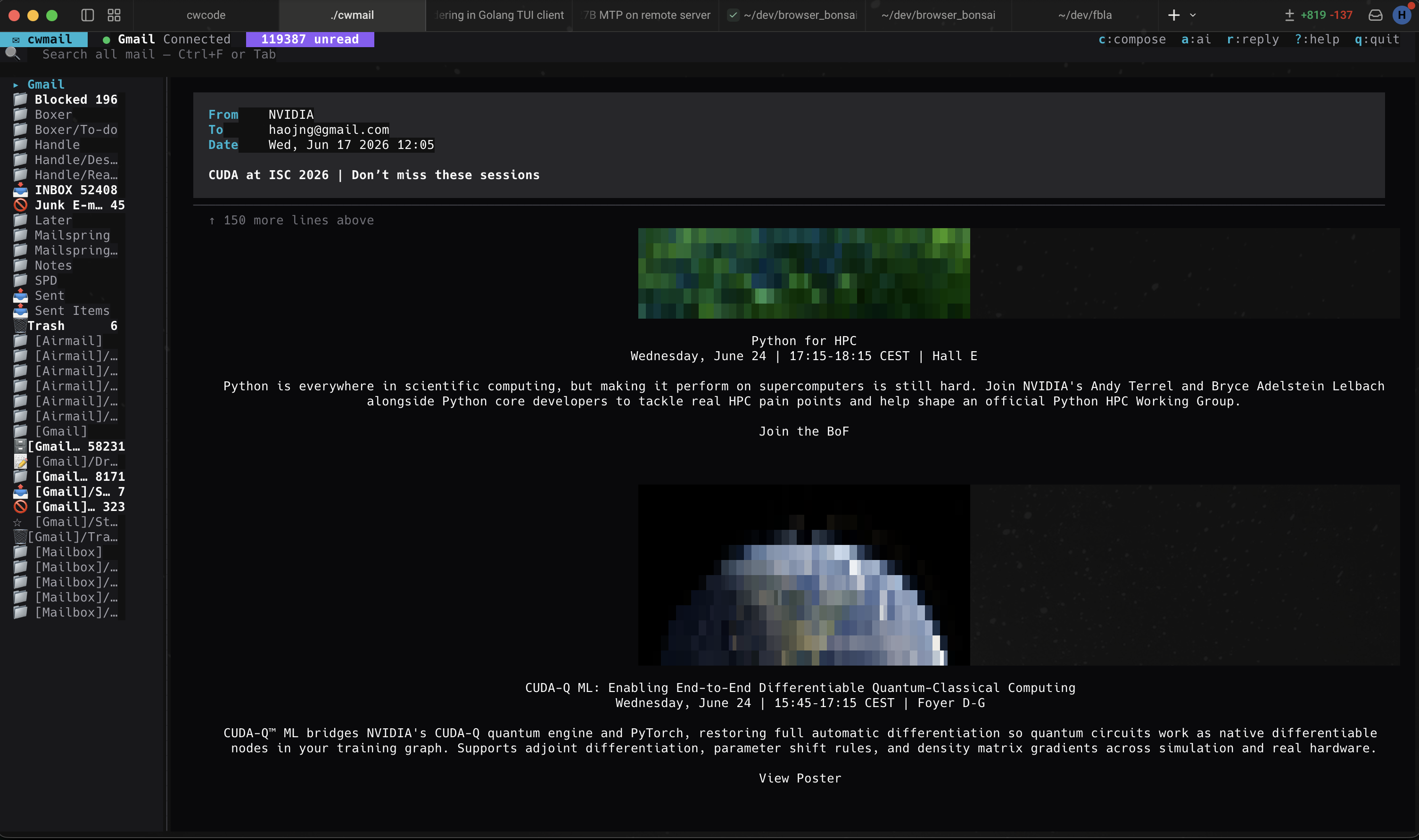
cwmail A terminal email client with proper HTML rendering, inline image support, multi-account IMAP, and AI-drafted replies powered by DeepSeek V4 Pro. Written in Go on Bubbletea v2. Reads real mail. Renders HTML newsletters, receipts, calendar invites, and event posters without dropping out to a browser. Drafts replies you can edit in place. IMAP multi-accountGmail, iCloud, Outlook, custom IDLE push notificationsnot polling AI DeepSeek V4 Prodrafts your reply What it is cwmail is a full-screen Bubbletea TUI for managing IMAP mailboxes. It handles the actual hard parts of email — MIME multipart, HTML rendering, charset detection, inline images, attachments, threading, drafts — not just the obvious ones. You can manage as many IMAP accounts as you want side-by-side in the sidebar. Folder navigation is fast (Vim-style or arrows), full-text search hits the local SQLite mirror so it returns instantly, and IDLE push keeps your inbox current without polling. Desktop notifications fire when new mail arrives. The AI-drafted-reply feature is a one-key action: hit R on any open message and the model produces a contextual reply draft in the composer. You can edit, send, save as draft, or discard. Same DeepSeek profile cwcode uses, so one API key powers both apps. It is not a service. There is no cwmail.io. Your IMAP credentials sit in ~/.config/cwmail/config.json; everything else lives in ~/.local/share/cwmail/. Offline-capable for everything except actually sending and fetching. Why it’s different Multi-account IMAP As many Gmail / iCloud / Outlook / custom-IMAP accounts as you want in the sidebar at once. Each account’s folder tree, unread counter, and IDLE connection is independent. The Spam, Trash, and Drafts folders are merged into a unified view by default. HTML emails that render Most terminal mail clients dump the plain-text alternative and call it a day. cwmail’s HTML-to-terminal converter handles tables, horizontal & vertical rules, ordered & unordered lists, block quotes, links, charset translation, and HTML entity decoding. Newsletters, receipts, event invites all read cleanly. Inline images Embedded and CID-referenced images render as half-block ANSI in 24-bit color (via pixterm-style rendering). Works on any terminal with true-color support. Useful for event banners, product photos in receipts, and inline charts. AI-drafted replies Hit R on any open message. The DeepSeek V4 Pro model drafts a contextual reply (using the same profile cwcode uses). You see the draft in the composer ready to edit. The model knows the prior thread, your typical tone, and whether to be terse or warm based on the conversation. Costs ~$0.01 per draft. IDLE push, not polling IMAP IDLE means the server tells the client when new mail arrives. cwmail keeps one IDLE connection per account open and surfaces new mail within a second of receipt. No 5-minute fetch cycles, no batch checking. Desktop notifications fire on arrival. Undo delete Delete moves to Trash and shows a brief “undo” toast for 8 seconds. Hit u and the message comes back. Matches matcha.email’s UX for the most common reflex mistake. Draft auto-save Any time you’re editing a reply or compose, the buffer is persisted to ~/.local/share/cwmail/drafts/ every few keystrokes. Crash, force-quit, accidentally close the window — the draft is still there next time you launch. CLI send mode cwmail send --to alice@example.com --subject “build done” --body “all green” — non-interactive sending, useful for AI agents (cwcode included), CI pipelines, and shell scripts. Reads body from stdin too. Same auth as the TUI. No SaaS lock-in Config is JSON. Local mirror is SQLite. Drafts are plain files under ~/.local/share/cwmail/. You can grep your own mail. Credentials live in the OS keyring (macOS Keychain, libsecret on Linux, Credential Manager on Windows). What it looks like Inbox view — multi-account sidebar, dense subject/from/date list, vim-style nav. HTML newsletter rendered inline — tables, event blocks, and inline images as half-block ANSI. AI-drafted reply — one keypress, contextual draft, then edit and send. Install Download a pre-built binary from the Google Drive release folder (current build: v0.9; macOS arm64 / amd64 and Linux amd64). Drop it somewhere on your PATH and make it executable: curl -L -o ~/.local/bin/cwmail chmod +x ~/.local/bin/cwmail cwmail --help Configure your first IMAP account in ~/.config/cwmail/config.json: { "accounts": [ { "name": "Gmail", "imap": "imap.gmail.com:993", "smtp": "smtp.gmail.com:587", "username": "you@gmail.com" } ], "ai": { "endpoint": "https://api.deepseek.com", "model": "deepseek-v4-pro", "api_key": "sk-..." } } Run it. cwmail # full TUI cwmail send --to a@b.com --subject hi # non-interactive send cwmail compose # straight to composer On first launch cwmail prompts for the Gmail app-password (or OAuth flow), stores it in the OS keyring, and starts the IDLE connection. FAQ Does it support Gmail OAuth? App-password is the default and the simplest path. OAuth is wired but requires registering a client; if that matters to you, get in touch. What about calendar invites? cwmail parses the ICS attachment and renders the event date, time, location, and summary inline. Hitting Accept sends the reply iCal; declining lets you add a brief note. Search? Full-text against the local SQLite mirror. Press / for instant search across subject, body, and sender. Server-side search is also exposed via /i:. Threading? RFC 5256 thread sort with In-Reply-To / References fallbacks. Conversations collapse and expand on Enter; navigation walks the tree. What does the AI reply actually look like? See the third screenshot above. The model is given the thread context plus a short system prompt that asks for a terse, professional draft. You can configure the tone in the config file. The draft lands in the composer ready to edit — nothing is sent without you pressing Ctrl+S. Is the source available? Pre-built binaries on Google Drive. Source currently private — will open once the IMAP edge cases settle. Reach out for early access. Does it work with cwcode? Yes — cwcode can call cwmail send as a CLI tool. We use this for “ship a build, email the team” runs at the end of long autonomous loops.