 R
↗
R
↗
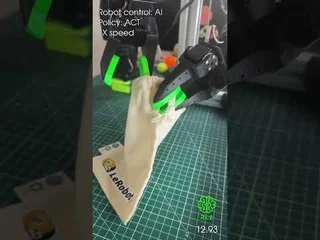
On my way to recording and open-sourcing a 1,000-episode bimanual manipulation dataset for the 3D-printed SO-101 robot. 🦾 Camera setup Intel RealSense D435 (head) 2× RealSense D405 (wrists) RGB only The video shows an autonomous rollout of my ACT policy controlling the robot. The policy was trained for 100,000 steps using only the first 100 teleoperated episodes of bag manipulation. Hugging Face: MrC4t Dataset: MrC4t/bi_so_bag ACT policy: MrC4t/act_bimanual_bag What task should I teach it next? 👀🦾 submitted by /u/Mr-c4t [link] [Kommentare]
 R
↗
R
↗
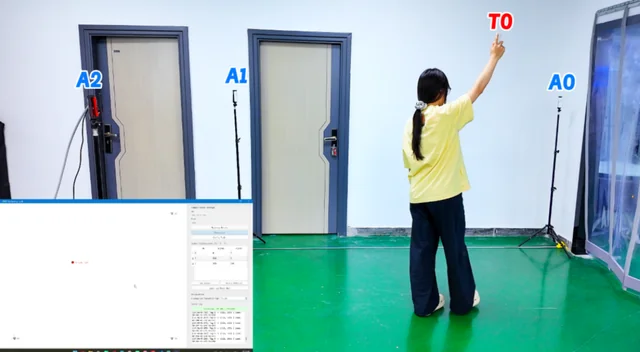
I've been experimenting with an Ethernet-based UWB localization setup recently and wanted to share the workflow. The idea is to keep the embedded side simple while moving the localization calculations to a PC. In this setup, the UWB nodes continuously perform ranging between the tag and anchors. An ESP32-S3 Ethernet gateway collects the ranging data and forwards it over the local network. A PC application then receives the data stream, calculates the tag coordinates in real time, and visualizes the results. Since all positioning algorithms run on the PC instead of the microcontroller, it's much easier to test different localization methods, manage multiple tags, or integrate additional data processing. Hardware Used · 3×UWB nodes (2 Anchors + 1 Tag) · 1×ESP32-S3 Ethernet (PoE) gateway · Ethernet cable · USB cable Step 1: Prepare the Hardware Prepare the required UWB devices, an ESP32-S3 Ethernet gateway, and the necessary cables. Step 2: Configure the UWB Nodes Assign the ID and role (Anchor or Tag) for each UWB node using the configuration tool. Step 3: Flash the Firmware and Connect the Devices Upload the firmware to the ESP32-S3 gateway, connect it to the local network, and establish communication with the UWB nodes. Step 4: Start Real-Time Positioning Open the PC application, set the anchor coordinates, and visualize the tag position updating in real time. Follow the steps above; I’ve built a complete Ethernet UWB positioning system with UWB devices. And the PC is keeping updating the trajectory of the moving tag. The firmware and PC application are available for anyone interested in reproducing or modifying the project. I'd be interested to hear how others structure their UWB localization systems. Feel free to talk in the comments below! submitted by /u/Vearts [link] [Kommentare]
 R
↗
R
↗
 R
↗
R
↗
some Robotnews over the last month. 10 different stories. Humanoids, Software, economic and manufacturing. see the ongoing shift. submitted by /u/ButterscotchTiny1114 [link] [Kommentare]
R
↗
I have decided to spend time on robotics , I really like it but I didn't like the professor who did it in uni so I never took his class.I have worked with motors before and I'm catching up with robotics math , however I still encountered something that I can't understand.Suppose you calculate everything and then you go to order a part from 3d printing to actually build your robot,how do you design that part?I mean how do you ensure that the combination of parts that you order can create a rotation using a motor?Do you get what I'm talking about?For example let's say that a robotic arm is made of 2 parts 1 immovable part which holds the rotating part on some axis?How do you actually design that?And why do some configurations work while others don't?Do you know a tutorial on the sort of where I can find the answer to my question? submitted by /u/Routine_Comb_7277 [link] [Kommentare]
R
↗
I have build 2 sources for Roboticists and Learners to connect and share valuable information , We will be launching Our own app that is free to use and also a Whatsapp group you can click apply any time : https://chat.whatsapp.com/HBfFW1ro98oKfqhffUe45k. I will send the app link in a few hours. the goal is simple " learn and teach and grow " submitted by /u/Physical_Chemist_987 [link] [Kommentare]
 R
↗
R
↗
R
↗
R
↗
Would it be fine to run Docker inside Docker? Suppose a user is on Arch Linux, I use Cachy actually. Could I use distrobox to set up a base Ubuntu image? Then just pull an official image like a PX4 container inside the distrobox container? Do you think this setup would be ideal for development work? submitted by /u/Fuceler [link] [Kommentare]
 R
↗
R
↗
That's a drone in the picture! Computational design generated a spinning drone that’s nearly transparent. Called the phantom twist, it's still loud, but it's quite hard to see with a human eye. See for yourself: https://www.youtube.com/watch?v=5KQ7dKs1dpQ&t=1s submitted by /u/IEEESpectrum [link] [Kommentare]
 R
↗
R
↗
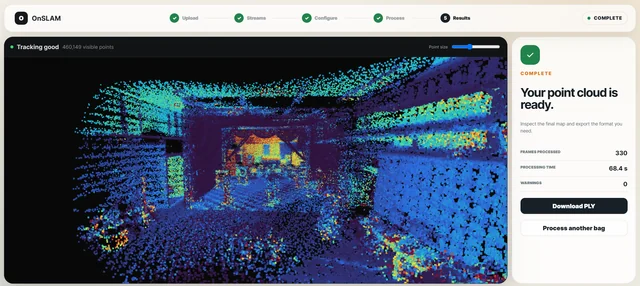
Hi everyone, I built OnSLAM, a Windows application that runs a LiDAR-inertial odometry and mapping pipeline directly on ROS1 bag files. The main idea is to make it easier for beginners, researchers, or anyone quickly testing datasets to go from a LiDAR-IMU bag to a point-cloud map without setting up Linux, ROS, Python environments, dependencies, or terminal commands. You install the .exe, launch it, and it opens a simple browser-based interface. The interface runs locally, so your bag files and processing data never leave your computer. OnSLAM can currently: inspect ROS1 bags for compatible LiDAR and IMU topics let you configure topics, extrinsics, time offsets, frame limits, and processing quality filter and downsample scans use IMU data as a motion prior align scans to a cached local submap using point-to-plane ICP display the map, trajectory, and tracking quality live export PLY, PCD, and dense point-cloud maps decode Livox CustomMsg data I am currently looking for people who can test it on different sensors, bag structures, and datasets. Bug reports, feature suggestions, and especially bags that fail to process would be really helpful. GitHub: https://github.com/musabali314/OnSLAM Download: https://github.com/musabali314/OnSLAM/releases Promise, the .exe is not a virus. Windows may still act suspicious because it is unsigned 😭 I am considering ROS2 .db3 support next, followed by possible camera or visual-inertial inputs. Which one would be more useful to you? submitted by /u/TaxOk8369 [link] [Kommentare]
 R
↗
R
↗
try it right now without installing anything. the fiftyone app is running in a hugging face space for the first time (its a bit hacky atm, but working on polishing it up) space: https://huggingface.co/spaces/harpreetsahota/fiftyone-app full walkthrough: https://voxel51.com/blog/view-mcap-files-fiftyone submitted by /u/datascienceharp [link] [Kommentare]
 R
↗
R
↗
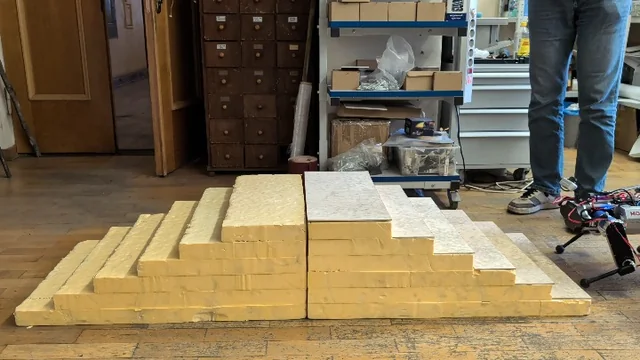
I’m happy to share another video of my quadruped robot climbing stairs! Since my previous post, I have added contact detection and modified the locomotion control algorithm. Previously, the robot used a fairly standard MPC + WBC + vision-based control framework. I have now added a reference generator based on the Linear Inverted Pendulum Model. It generates dynamically consistent body position, velocity, and acceleration trajectories for the MPC and WBC controllers. This modification significantly improved the robot’s stability. It also allowed me to increase the swing duration of each leg, resulting in smoother foot trajectories, softer ground contacts, and quieter locomotion. submitted by /u/yoggi56 [link] [Kommentare]
 R
↗
R
↗
Hey everyone, During active robot bring-up and debugging, I always found myself constantly context-switching between five different terminal windows (one for colcon build, one for ros2 launch, one for checking topics/nodes, one for my editor, etc.). To fix this, I built **ros2_info**—a full-screen, VS Code-style Terminal User Interface (TUI) designed specifically for ROS 2 workflows. It gives you a complete workspace lens with zero Electron weight. ### 🌟 Key Features: * **6 Live Dashboard Tabs:** Real-time visibility into Overview, ROS 2 graph state, Workspace, Diagnostics, Trends, and Fleet. * **Real PTY Terminal:** Run `ros2` commands, `colcon build`, and launch files live inside the dashboard (not just a basic command wrapper). * **Multi-tab Editor:** Built-in code editor with syntax highlighting, find/replace, and Neovim keybindings for quick tweaks over SSH. * **Local Offline AI Assistant:** Powered by Ollama (`ai scan`, `ai fix`, `ai explain`). It can catch build errors and offer diff-gated fixes completely offline. * **Sandbox Mode:** Safely isolate nodes, topics, and services from your real system to experiment freely. Because it's built with **Rust + Ratatui**, it runs incredibly fast, has no heavy dependency chains, and works flawlessly over SSH on a Raspberry Pi or Jetson. 🔗 **Check out the repo here:** https://github.com/Gaurav-x111/ros2\_info I'd love to hear your feedback or feature requests! If this looks like something that could speed up your robotics workflow, dropping a ⭐ on GitHub would mean the world to me! submitted by /u/zang-x111 [link] [Kommentare]
 R
↗
R
↗
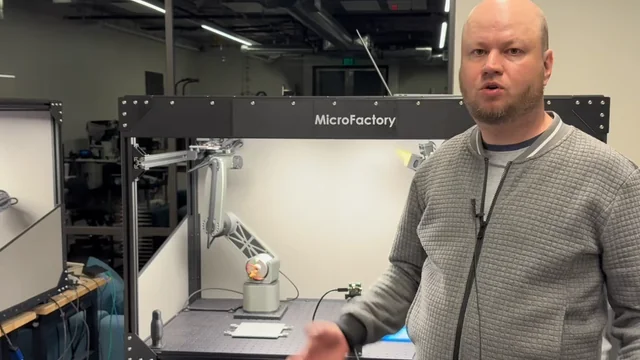
Hi! Our general-purpose robot can now use tools. Humanoid hands, and especially the models controlling them reliably, aren’t available yet, so we’re focusing on making the options we can use right now and actually work. submitted by /u/Wing-Realistic [link] [Kommentare]
 R
↗
R
↗
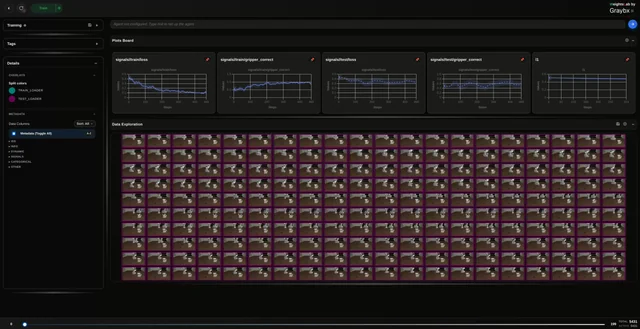
After months of chasing benchmark numbers and metrics that looked great, but our robot kept making weird, unnatural misses and dropping objects mid-grab, we finally stopped tuning the model and went digging through the data itself. By tracking per-sample loss, classifying each sample's loss-trajectory shape, and doing some manual inspection, we found at least 10 counterproductive sequences in the train split (and a few in eval) of LIBERO, a widely used robot-learning benchmark. In several of them, the object is missed or falls mid-grab, and the model is being trained and even evaluated on exactly those. Q1. What's the right way to handle these partial/failed sequences? Straight deletion feels wrong. Some of that "fail then recover" signal might actually be teaching the policy to recover. Q2. What do people use to actually understand their data in this space, beyond eyeballing episodes? submitted by /u/taranpula39 [link] [Kommentare]