 V
↗
V
↗
Vim Classic 8.3 released [2026-06-02] I'm proud to announce the release of the first version of Vim Classic, Vim Classic 8.3.0, a stable, long-term support fork of the ubiquitous text editor, maintained without the assistance of generative AI tools. For more information about the motivations for this fork, please read this blog post. This release is based on Vim 8.2.0148, with a number of bug fixes and patches conservatively backported from future versions of Vim upstream. We elected to clean up this version of Vim, prepare it for a release, and imagine an alternate history where Vim 8.3 was released without Vim9 script. The result is Vim Classic 8.3. We chose to take this approach in order to reduce the long-term maintenance burden of Vim Classic, acknowledging that our fork lacks the resources and institutional knowledge available to Vim upstream. However, a consequence is that there are some Vim plugins which are not compatible with Vim Classic. We have made a special effort to assess patches from Vim upstream which mitigate some of the many CVEs affecting Vim which were discovered and fixed between versions 8.2 and modern-day Vim, but we can't be sure we've got all of the security patches which are applicable to Vim Classic (and practically exploitable). This version of Vim Classic is therefore recommended for early adopters who are comfortable adopting a security posture which accounts for the fact that we may have overlooked some bugs. We have not evaluated all of the many thousands of patches to land in Vim since version 8.2.0148, so your favorite bug from the last few years might make a reappearance when you install Vim Classic. Your patience and especially your assistance in identifying and backporting the applicable bug fixes for your use-cases is appreciated. Vim Classic is charityware, much like Vim, and we are happy to continue supporting Bram's passion of providing for children in need in Uganda. Switching from Vim to Vim Classic would be an opportune moment for you to make a donation! You can download Vim Classic from SourceHut: .tar.gz vim-classic-v8.3.0.tar.gz .tar.gz.sig vim-classic-v8.3.0.tar.gz.sig This release is signed with my PGP public key. Please subscribe to vim-classic-announce to be notified of important (actionable) news and releases in the future. Last, but not least, let me extend a big "thanks!" to everyone who jumped in to enthusiastically test Vim Classic, provide feedback, and contribute many patches and backports to get this release done. Happy editing! — Drew DeVault
 M
↗
M
↗
Extension for Visual Studio Code - Browse Hacker News in the sidebar, preview articles, and save stories to Obsidian.
 R
↗
R
↗
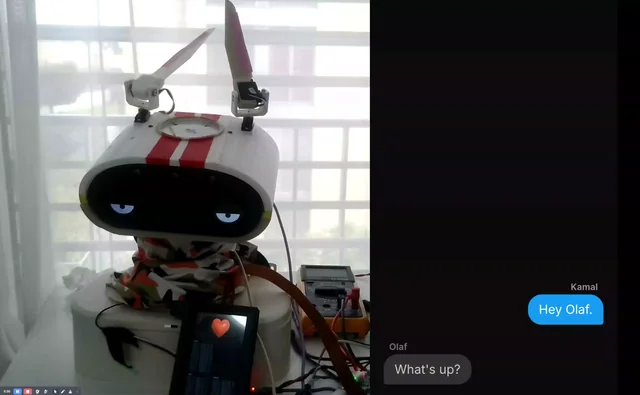
Been building Olaf, a companion robot, in the open for a while now and just closed out the phase focused entirely on making him expressive instead of just functional. Sharing the demo + what changed: Voice: swapped Cartesia for Google TTS — noticeably more expressive and natural. Head motion: tuned so movement tracks the words and tone of speech rather than firing randomly. Ears: redesigned the ear movement — surprisingly big impact on how readable his "mood" is. Heart: added a small display on the body that renders a beating heart. Multilingual: he can switch languages mid-conversation (in the demo he answers in Hindi). Still tuning the audio side. That's the expression engine done bar some fine-tuning. Next phase is the body — getting him mobile so he can move around the apartment. Everything's open source if you want to dig in. Would appreciate a star: Hardware: https://github.com/kamalkantsingh10/OLAF Voice agent / pipeline: https://github.com/kamalkantsingh10/olaf_companion Happy to answer anything about the build. Feedback very welcome — especially on the motion-to-speech syncing: right now I'm driving head/ear motion off the LLM output, and I'd love to hear how others have approached tying gesture to prosody. submitted by /u/KamalSingh10 [link] [Kommentare]
 G
↗
G
↗
Google Drive kann privat mit einem Google-Konto oder geschäftlich mit einem Google Workspace-Konto verwendet werden.
 Z
↗
Z
↗
This web-based Linux platform makes it easy to explore dozens of distributions, from the familiar to the obscure. It's free and works in any browser.
 X
↗
X
↗
A few months ago, I was reading “The Anatomy of an Agent Harness” by Viv (@Vtrivedy10). It’s a deep dive on what a harness is, why it’s important, and which ...
 C
↗
C
↗
Search-and-rescue volunteers in Japan have found the body of an Auburn University student who went missing during a family vacation, his family said, marking a tragic end to a frantic dayslong search across forested mountains.
 R
↗
R
↗
The Seeed team will be in Garching-Hochbrück near Munich tomorrow for a hands-on workshop with reBot Arm, our fully open-source robotic arm. Try it in person, ask technical questions, meet robotics folks, and grab some pizza with us. Limited spots: https://www.eventbrite.co.uk/e/robotics-builders-meetup-hands-on-with-rebot-arm-tickets-1990578698472 submitted by /u/MiuoChar [link] [Kommentare]
 X
↗
X
↗
We’ve detected that JavaScript is disabled in this browser. Please enable JavaScript or switch to a supported browser to continue using x.com. You can see a list of supported browsers in our Help Center. Allgemeine Geschäftsbedingungen Datenschutzrichtlinien Cookie-Richtlinie Impressum Anzeigen-Info © 2026 X Corp.
 P
↗
P
↗
We noticed that something strange is happening. We're all writing software with AI, but we are mostly doing it alone, with no real sense of how anyone else does it. So we made a tool to help you understand how you build with AI. It reads your Claude, Codex, and Cursor sessions, so you can discover things about how you build. With time, as more people upload theirs, we'll be able to show you how you compare to other builders. So far, 233,881 sessions have been uploaded and analyzed. Here are examples of what people have learned about their coding habits... This is an experiment from YC. Nobody really knows yet what it means to build well with coding agents, and we are trying to find out. It looks at the AI session transcripts on your computer. Where you run the command tells it whether to analyze every project at once or just one. Best for a broader picture across projects. Change into the parent folder that holds your repos, then run. Best for focusing on a single project. Change into that project's folder (replace ~/path/to/your-project with the real path) and run. You can use this prompt in Claude, Codex, or Cursor to find all your repos on your machine with AI transcripts, show you the list, and hand back ready-to-run commands for the ones you pick. You get a builder profile, a snapshot of how you work with AI across five dimensions of steering, execution, engineering, product instinct, and planning. We name the archetypes we see in your sessions, whether you build like an Architect, a Quality Guardian, a Velocity Machine, or a Night Owl. We also pull out your decision patterns, the signature moves you make when directing the AI, drawn from real exchanges in your transcripts. Then we point at your growth edge, a few specific things to try next, grounded in your actual sessions rather than generic advice. Sign in with your email, then run the command in your terminal from the repo you want analyzed. The analysis runs in Docker on your own machine, so you'll need Docker installed and running first. In about 15 to 30 minutes you get your profile back with scores, archetypes, decision patterns, and a growth edge. Your working tree, your .env files, and your raw transcripts stay on your machine. Only short transcript excerpts go to Claude or GPT so we can summarize and score, and what reaches YC is a small payload of scores, narratives, and redacted decisions. You can read the full breakdown. Your working tree and .env files are not uploaded to YC. During analysis, transcript excerpts (prompts, agent responses, and snippets of tool calls) are sent to Claude or GPT via our proxy so we can summarize what happened. At the end of the run, a JSON payload of scores, narratives, redacted decisions, and session metadata is uploaded to YC. Full breakdown. Claude Code, Codex CLI, and Cursor. We read the transcripts each tool stores locally. Yes. The analysis runs locally in a Docker container on your own machine. Install Docker Desktop (or any Docker runtime like colima or OrbStack) and make sure it's running before you run the command. If the engine isn't up, the script prints exactly how to start it. 15-30 minutes depending on how many sessions you have. You get an email when it's ready. Yes. Run from a parent directory and pick which repos to include, or pass --project NAME. Whenever you want an updated profile. Each upload produces a new report; your profile aggregates across all of them. What's the difference between a report and a profile? A report is a snapshot of one upload. Your profile synthesizes patterns across all your reports: how you've evolved, what's consistent, where you're growing. I code on multiple machines. Can I get credit for both? Yes. Just run the same curl command on each machine. Log in with the same email and your builder profile will automatically aggregate sessions across all of them. How do I attach my Paxel token to my Startup School application? Linking your Paxel token boosts your chances of getting into Startup School 2026. Open your reports page and find your token. If you haven't applied yet or you're still on the waitlist, click the attach link to send your token straight to your application, or copy the token and paste it in yourself. I found a bug or have a feature request. Where do I send it? Use this form to report a bug or request a feature. For feature requests we like, we'll run your prompt with a coding agent and merge the result. Report a bug or submit a feature request Tell us below if you found something broken or want this tool to do something it can't yet. For feature requests we like, we'll run your prompt with a coding agent and merge the result. Try it on one of your repos and you'll have results in about 20 minutes, with YC covering the cost and your code never leaving your machine. Upload