Channels
I submitted one of my NeurIPS review ~6 hrs later than the official deadline. Will this still affect my own submission? Asking because I’m a first time reviewer. I pinged the AC a day before that I might be a few hours late, but didn’t hear back. So wondering if I might have triggered something that’ll now affect my own submission. submitted by /u/confirm-jannati [link] [Kommentare]

Rate any nation, predict any matchup, simulate the 2026 World Cup, and see how a simple model compares to the betting market.
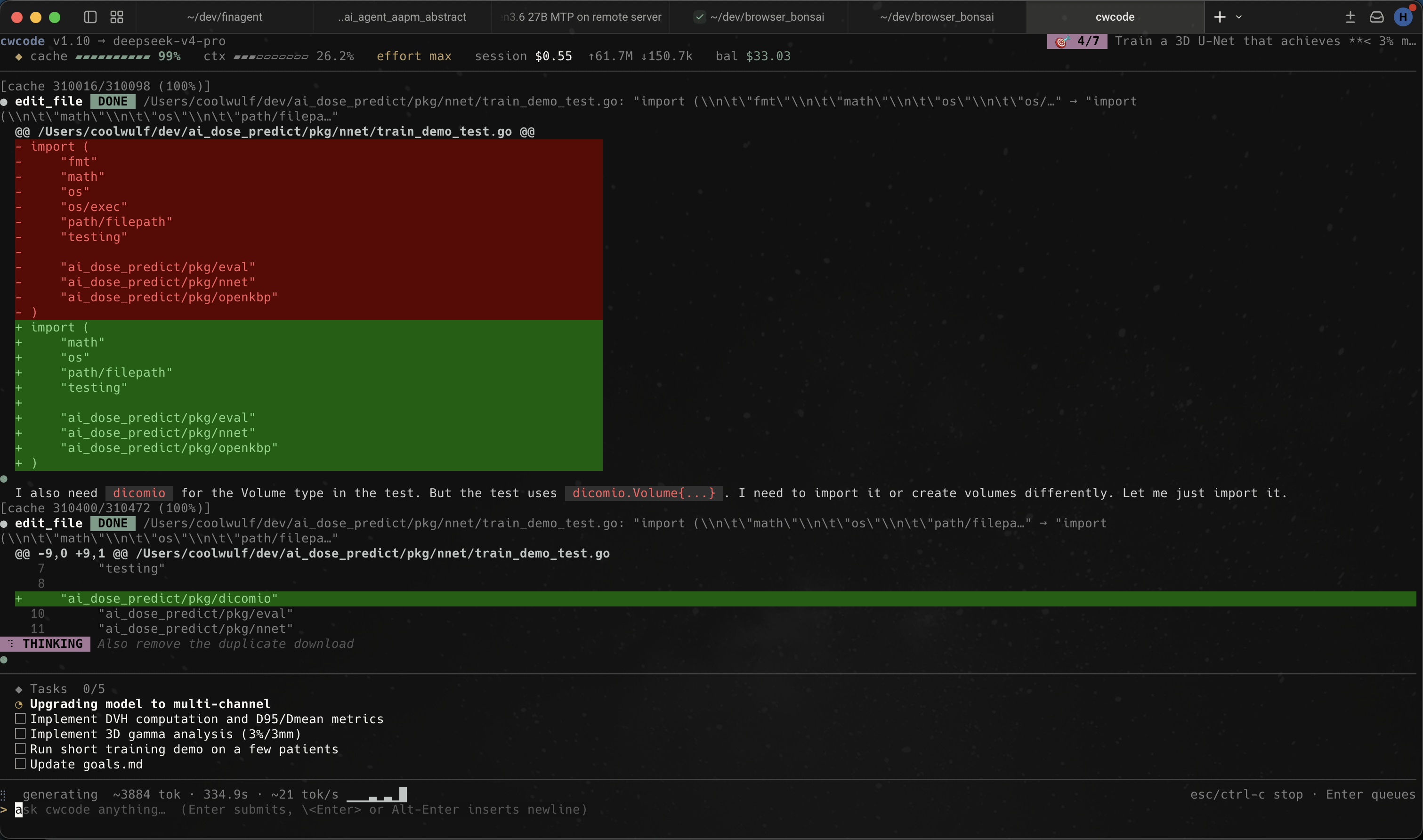
cwcode A terminal coding agent built around DeepSeek V4 Pro, Qwen3.6‑27B, Kimi, Azure, and anything else that speaks OpenAI’s chat API. Written in Go. Lives in your terminal. Edits real code. Recovers from its own mistakes. Costs about $0.40 to leave running for an hour. 5% of Claude’s token coston DeepSeek V4 Pro 85%+ prefix-cache hit ratioafter turn 3 ~12k lines of Gono external services What it is cwcode is a Bubbletea TUI that drives any OpenAI-compatible chat endpoint as a tool-using coding agent. It ships with profiles for DeepSeek (Pro and Flash), Azure OpenAI, Kimi for Coding, and a local vLLM / llama.cpp profile for Qwen3.6-27B on a home server. Switching profiles mid-session is one slash command. It has bash, file edit, glob, grep, web fetch, headless-Chrome fetch (driven via CDP through your real browser), sub-agents, a persistent semantic-memory store, content-addressed checkpoints with rewind, a plan/code mode toggle, and an autonomous goal loop. The tool registry is six hundred lines and adding a new tool is a two-method Go interface. It is not a SaaS. There is no account, no telemetry, no remote control plane. Your API key sits in ~/.cwcode/config.json. Your session history sits in ~/.cwcode/sessions/. If your network is down and the model endpoint is local, the agent keeps working. Why it’s different Hash-anchored edits The read_file tool annotates every line with a 3-character content hash: 42:a3f| return x. The edit_lines tool takes (line, hash, new_text) and rejects the entire batch if any hash drifted. The model never has to reproduce content character-perfect to land an edit. Adopted from Can Akay’s February 2026 post and ported to Go in about 200 lines. Output tokens per session dropped 30–40% on V4 Pro. Sticky prefix cache The system prompt is byte-stable across turns. Tool definitions serialize in a deterministic order. Reasoning content is stripped from outbound requests on every provider by default. DeepSeek’s prompt-cache hit path is ~120× cheaper than the miss path, and our /cache slash command shows session-cumulative hit ratio that routinely exceeds 85% after the third turn. Plan vs code mode A single Shift+Tab toggle between read-only planning (the LLM only sees non-mutating tools) and full execution. The model doesn’t see the flag — it just sees a different (smaller) tool registry and a system-prompt addendum. The human holds final control unless you opt into YOLO mode. Checkpoint & rewind Before any file-mutating tool runs, the harness snapshots the pre-state of every path the tool declares it will touch. Snapshots are SHA-256-keyed blobs in ~/.cwcode/sessions//objects/, deduped automatically. /rewind N restores files, truncates conversation history, and pre-fills the input box with the original prompt. Storm-breaker When the same tool fails identically three times in a row, the harness doesn’t silently abort. It synthesizes a plain-language response (“I’m unable to continue: read_file failed three times because the path was empty. Please clarify…”), streams it like a normal reply, and appends it to history so follow-ups have context. Autonomous goal loop /goal appends a goal to goals.md. /goal on starts an autonomous loop that runs back-to-back turns until every checkbox is marked done or until a safety cap of 20 consecutive cycles. We use this for four-hour overnight runs on annotated tasks. No SaaS lock-in Config is JSON. Sessions are JSON. Checkpoints are content-addressed blobs. Memory store is a SQLite file. Everything lives under ~/.cwcode/. If the project disappeared tomorrow your sessions are still readable. What it looks like Captured during real work on our dose-prediction codebase: the agent proposing an edit_file change to a Go test, with a unified diff highlighted inline, the reasoning trace streaming below, and the current task list pinned to the bottom of the pane. cwcode running a Go test edit; multi-tab tmux session, dose-prediction project, DeepSeek profile. Install Download a pre-built binary for your platform from the Google Drive release folder (current build: v1.11; macOS arm64 / amd64 and Windows amd64). Drop it somewhere on your PATH and make it executable: curl -L -o ~/.local/bin/cwcode chmod +x ~/.local/bin/cwcode cwcode -version You’ll need an OpenAI-compatible endpoint (DeepSeek API key, Azure deployment, local vLLM, or whatever else you have on hand). Configure a profile in ~/.cwcode/config.json: { "active_profile": "deepseek-pro", "profiles": { "deepseek-pro": { "provider": "deepseek", "endpoint": "https://api.deepseek.com", "model": "deepseek-v4-pro", "api_key": "sk-...", "ctx_size": 262144 } } } Run it. cwcode # Bubbletea TUI cwcode -p "fix the bug" # one-shot, no session cwcode -continue # resume the most recent session cwcode -plain # stdout REPL (no TUI) Built-in tools namepurposeneeds approval bashrun a shell command (streaming output)yes bash_backgroundspawn a long-running processyes read_fileread with per-line content hashesno write_filecreate or overwrite a fileyes edit_fileexact-string replace with whitespace recoveryyes edit_filesatomic multi-file batch (exact-string)yes edit_lineshash-anchored line replacementyes globfind files by patternno grepsearch files for a regexno lslist directory contentsno web_fetchfetch a URL and clean it upno chrome_fetchdrive your real Chrome via CDP for bot-blocked pagesno taskspawn a sub-agent with its own contextyes rememberadd a fact to the persistent memory storeno recallsemantic search over past sessionsno todo_writeupdate the visible task listno FAQ Why Go? Single static binary, fast startup, easy cross-compile. Three platform builds in 90 seconds. The TUI binary on macOS is 24 MB with debug symbols stripped. Why a terminal app and not a VS Code extension? Because we wanted the agent to be the primary interface, not a side panel. The TUI gives the model the whole pane to work in and gives us a small surface to debug. If you live in VS Code, you can run cwcode in the integrated terminal. Does it work with Claude? Not directly — cwcode speaks the OpenAI /v1/chat/completions shape. Claude has its own API. You can put Claude behind a translating proxy if you want, but we built this for the cost shift in the other direction. What model do you use day to day? DeepSeek V4 Pro for most coding work, Flash for quick questions and one-shot scripts, the local Qwen3.6‑27B profile when we want zero latency or are working offline. Is the source available? Pre-built binaries are on Google Drive. Source is currently private; we plan to open it once the API surface settles. If you want a peek before then, get in touch. Who built this? A small team that uses it daily for dose-prediction model training, financial research agents, and writing cwcode itself. The agent ships its own bugs and writes its own fixes.

Modern GPU Programming For MLSys Contents Modern GPU Programming For MLSys# Machine learning systems sit at the heart of modern AI workloads. In these systems, performance often comes down to the quality of a small number of GPU kernels. Attention kernels, LLM prefill and decode kernels, low-precision block-scaled GEMMs, fused MoE layers, and other large fused kernels all directly shape end-to-end speed in both training and serving. To make these kernels fast, however, we need more than a list of optimization tricks. Modern GPUs are no longer simple variations of the same old design. Recent architectures introduce richer memory spaces, new access patterns, and increasingly specialized execution units. To program them well, we need both a clear mental model of the hardware and a practical understanding of how high-performance kernels are built. This book is about developing both. The book follows a simple progression: first understand the GPU hardware, then learn the programming model we will use, and finally build state-of-the-art kernels step by step. Our main target is the Blackwell generation, and our main running examples are fast matrix multiplication (GEMM) and FlashAttention. Along the way, we will also study the core ingredients behind GPU optimization: data layout, asynchronous data movement, and asynchronous coordination. The material grows out of the Machine Learning Systems course series at Carnegie Mellon University. To make the ideas easier to study and easier to run, this book uses the TIRx Python DSL to build real GPU kernel examples step by step. TIRx stays close to the hardware, which lets us reason about low-level control while still learning through runnable code. How This Book Is Organized# Part I, Understanding the GPU. This part introduces the overall organization of the GPU, general recipes for writing fast kernels, and key concepts such as data layout, asynchronous memory operations, and coordination. It builds the hardware intuition that the rest of the book relies on. Part II, TIRx Overview. This part introduces the key elements of TIRx, which serve as the foundation for the code examples throughout the book. Part III, GEMM: Tiled to SOTA. A complete guide to optimizing a tiled GEMM, built up through TMA pipelining, persistent scheduling, warp specialization, and 2-CTA clusters. Part IV, Flash Attention 4. A complete attention kernel built from the Part III techniques: two MMAs with softmax between them, online-softmax rescaling, causal masking, and GQA. Reference. TIRx language reference and compiler internals. Part I, Understanding the GPU GPU Execution Model What Makes a Kernel Fast Data Layout and Its Notation Tensor Core Operand Layouts Across GPU Generations Async Data Movement: TMA Tensor Cores: tcgen05 Special Memory: TMEM Async Coordination: mbarriers Advanced: Cluster Launch Control Part II, TIRx Overview Introduction to TIRx TIRx Layout API Part III, GEMM: Tiled to SOTA Building a Tiled GEMM GEMM Optimization Path Step 1: Sequential Single-Tile GEMM Step 2: K-Loop Accumulation Step 3: Spatial Tiling (Multi-CTA) Exercises Pipelining GEMM with TMA Step 4: TMA Async Load Step 5: Software Pipeline (PIPE_DEPTH=2) Step 6: Persistent Kernel + Tile Scheduler Exercises Scaling GEMM with Warp Specialization and Clusters Step 7: Warp Specialization + Pipeline Step 8: 2-CTA Cluster Step 9: Multi-Consumer Warp Specialization End-to-End Result Exercises Part IV, Flash Attention 4 Flash Attention 4 Algorithm Shape Tile-Primitive Graph Warp Roles and Scopes Reading the Fragments The Two MMA Phases TMEM Layout and Reuse How Barriers Connect the Roles Pipelining Structure Rescaling and Writeback Causal Masking GQA Support Tile Scheduling Compile and Verify Differences from GEMM Exercises Reference Reference Debugging Warp-Specialized Kernels Compiler Internals TIRx Language Reference Contents

Since June 12, we’ve been working closely with the US government to restore access to Claude Mythos 5 and Fable 5. Today, the government notified us that Mythos 5, our strongest cybersecurity model, can be redeployed to a set of US organizations that operate and defend critical

An open source simulator based on the classic game Transport Tycoon Deluxe. It attempts to mimic the original game as closely as possible while extending it with new features.
Turn sheet music pages using blink detection via webcam.
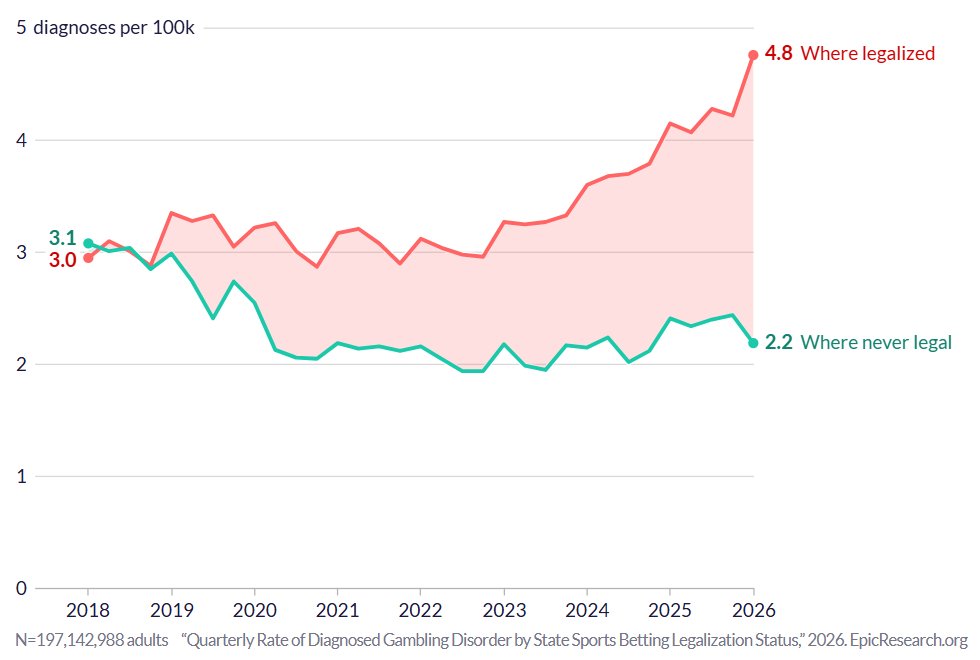
Gambling disorder cases have started skyrocketing in states where sports betting is legal (this started ~May, 2018) following the end of COVID. They've remained flat from COVID to today in states where it has remained illegal. https://t.co/bA9TAIFO5p